This guide explains how to check admission list for 2026/2027 in Nigeria, including how to check your admission status on JAMB CAPS, how to find your name on a school’s admission list, what to do if your name is missing, and how to confirm whether your admission is genuine.
Checking an admission list is one of the most important steps for candidates seeking admission into Nigerian universities, polytechnics, colleges of education and other tertiary institutions for the 2026/2027 academic session. After writing the Unified Tertiary Matriculation Examination (UTME), completing post-UTME screening or applying through Direct Entry, every candidate wants to know whether their chosen institution has offered them admission.
The good news is that candidates can check admission lists online through their school’s official admission portal and the Joint Admissions and Matriculation Board (JAMB) Central Admissions Processing System (CAPS). However, the process differs from one institution to another, and not every school releases its admission list at the same time.
It also provides official links, practical troubleshooting tips and answers to common questions candidates ask about the 2026/2027 admission process.
Quick guide: How to check admission list
-
Visit the official website of your chosen institution.
-
Open the Admissions, Admission List or Prospective Students section.
-
Select the 2026/2027 academic session, if available.
-
Enter your JAMB registration number or other requested details, or download the published admission list.
-
Check your admission status on the official JAMB e-Facility portal.
-
If you receive an offer, follow the official instructions to accept it and complete the required registration.
Is the 2026/2027 Admission List Out in Nigeria?
The 2026/2027 admission lists are being released by institutions at different times. There is no single date on which every Nigerian tertiary institution publishes its admission list.
As of 20 October 2026, official updates confirm that some institutions have started publishing admission information for the 2026/2027 session. For example, Osun State University (UNIOSUN) has announced the release of its 2026/2027 UTME merit admission list, while the Federal University of Education, Kontagora, has published a first-batch admission list on its official website.
This does not mean that every university, polytechnic or college of education has released its list. Admission processing may continue in batches, and the position can change as institutions complete their screening and approval processes.
To find out whether your institution has released its admission list, visit the school’s official website and check its latest admission announcements. You should also check your JAMB CAPS account regularly.
| Admission question | What you should know |
|---|---|
| Is the 2026/2027 admission list out? | Some institutions have published lists; availability depends on the school. |
| Where can I check my admission? | On your institution’s official admission portal and JAMB CAPS. |
| Can I check admission with my phone? | Yes, provided you have internet access and your details. |
| Does a missing name mean rejection? | Not necessarily. Your institution may still be processing applications or releasing lists in batches. |
| Is admission complete when my name appears on a school list? | You should also confirm the offer through JAMB CAPS where applicable and follow all official instructions. |
For current updates, start with the official JAMB website and your institution’s own website. Avoid relying only on social media posts or forwarded messages.
What Is an Admission List?
An admission list is an official record of candidates who have been offered admission into an educational institution for a particular academic session. It may contain candidates admitted into different courses, departments and programmes.
Depending on the institution, admission lists may be published online as searchable records, downloadable PDF files, portal notifications or announcements directing candidates to check their individual status.
For the 2026/2027 session, an institution may publish more than one list as its admission exercise progresses.
Common types of admission lists include:
-
Merit admission list: Candidates admitted based on the institution’s merit and selection criteria.
-
First-batch admission list: The first group of candidates offered admission.
-
Second-batch admission list: Another group admitted after the first batch.
-
Supplementary admission list: Additional candidates considered for available spaces, where the institution conducts supplementary admissions.
-
Direct Entry admission list: Candidates considered for admission through the Direct Entry route.
-
Departmental or programme-specific lists: Lists covering particular courses or programmes.
Not every institution uses all these categories, and the names of the lists may differ between schools.
An admission list is different from a screening registration list. A screening list may show candidates who registered for an admission exercise, while an admission list identifies candidates who have received an offer.
How to Check Admission List for 2026/2027 on Your School Portal
The first method is to check the admission portal of the institution you applied to. Each school has its own website layout, so the steps may differ slightly. However, the general process is similar across many Nigerian tertiary institutions.
Follow these steps.
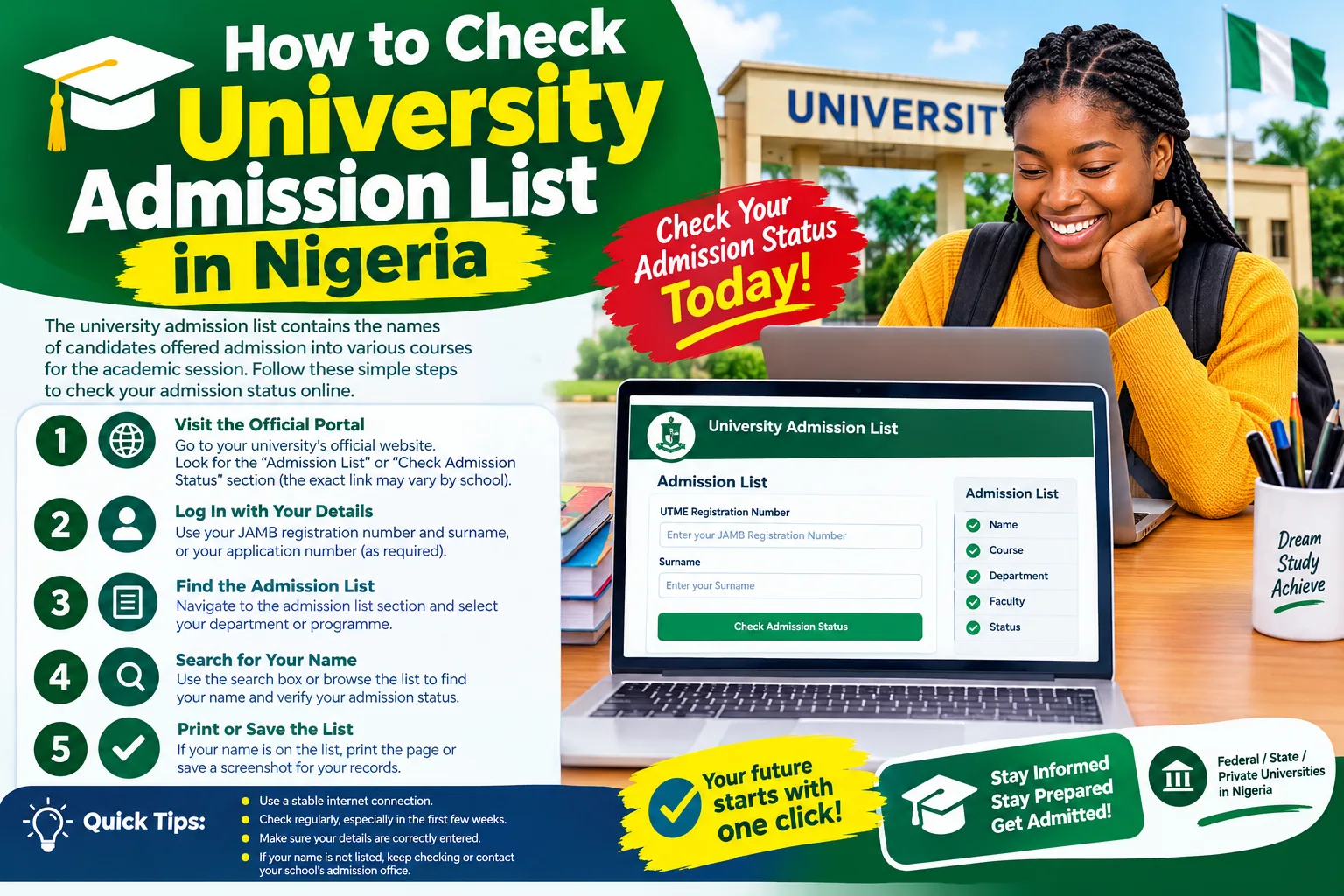
Step 1: Visit Your Institution’s Official Website
Open your browser and enter the official website address of your university, polytechnic or college of education.
If you do not know the correct address, search for the school’s name and verify that the result belongs to the institution itself. Check the website address carefully before entering personal information.
Do not assume that every website with the school’s name in its address is official.
Step 2: Find the Admission Section
Look for a menu or page labelled one of the following:
-
Admissions
-
Admission List
-
Check Admission Status
-
Undergraduate Admissions
-
Prospective Students
-
2026/2027 Admission Exercise
Some schools place admission information on their main website, while others use a separate admission portal.
Step 3: Select the 2026/2027 Academic Session
If the school has published lists for multiple academic sessions, select the 2026/2027 session.
Be careful not to check the 2025/2026 admission list by mistake. The correct session should correspond to the application you submitted.
Step 4: Enter Your Details
Depending on the portal, you may need to enter your JAMB registration number, application number, surname or another identifying detail.
Enter your information exactly as required. If the portal requests a registration number, avoid adding spaces or changing any characters.
Some institutions may not require a login to view a published list. Others require candidates to sign in to their admission accounts.
Step 5: Click the Check or Submit Button
After entering your details, click the appropriate button, such as Check Status, Submit, Search or View Admission Status.
Wait for the result to load. If your name appears, confirm the course, admission category and academic session.
If the institution publishes a PDF list, download it from the official website and search for your name or JAMB registration number using the document viewer’s search function.
Step 6: Follow the School’s Official Instructions
If you have been offered admission, read the next steps carefully. These may include accepting an offer on JAMB CAPS, paying an authorised acceptance fee, printing an admission letter or completing online clearance.
Do not make a payment simply because a page displays your name. Confirm the payment instructions and deadline on the school’s official website.
How to Check Admission List on JAMB CAPS for 2026/2027
JAMB CAPS means the Joint Admissions and Matriculation Board’s Central Admissions Processing System. It was developed to support and automate the admission process into Nigerian tertiary institutions. It also allows candidates to confirm admission offers and provides a central record of admission decisions.
For the 2026/2027 admission session, checking CAPS is an important step because a school’s internal admission list and the final admission record on JAMB may not update at the same time.
Official JAMB links
Log in to your candidate account and access available admission services.
Access the Central Admissions Processing System and its available services.
Find official guidance on admission problems, account access and other candidate services.
Step 1: Open the JAMB e-Facility Website
Visit https://efacility.jamb.gov.ng/ using your phone or computer.
Ensure that you are on the official JAMB website before entering your login details.
Step 2: Log In to Your Account
Enter the email address and password associated with your JAMB e-Facility account.
If you have forgotten your password, use the official password-recovery option and follow the instructions. Do not create another account just because you cannot remember your existing login details.
Step 3: Find the Admission Status Service
After signing in, locate the admission-related services on your dashboard. Select the appropriate option to check your admission status or access CAPS.
The arrangement of services can change, so follow the instructions currently displayed on the official portal.
Step 4: Select the Correct Examination Year
If you are asked to choose an examination year, select the year applicable to your 2026/2027 admission application.
For most candidates who applied through the 2026 UTME, this will be the 2026 examination year. Direct Entry applicants should follow the options and instructions applicable to their application.
Step 5: View Your Admission Status
Follow the on-screen instructions to open your admission record. Review the status displayed and check whether an institution and course have been listed.
Depending on the current portal interface and your account, the available options may differ. Do not use an institution’s administrative login page in place of the candidate service.
Step 6: Accept or Reject an Offer Where Required
If JAMB CAPS displays an admission offer, carefully check the institution and course before responding.
Use the available official controls to accept or reject the offer, as appropriate. Do not click an option without understanding the consequences, particularly if you have a different offer or are waiting for another institution.
If you have accepted an offer, follow any further instructions shown on CAPS and your school’s portal.
What Do Different Admission Status Messages Mean?
When checking your admission list for 2026/2027, you may encounter different messages. Understanding them will help you decide what to do next.
| Status or message | General meaning | What you should do |
|---|---|---|
| Admitted | An admission offer has been recorded on the relevant system. | Verify the course and institution, then follow the acceptance instructions. |
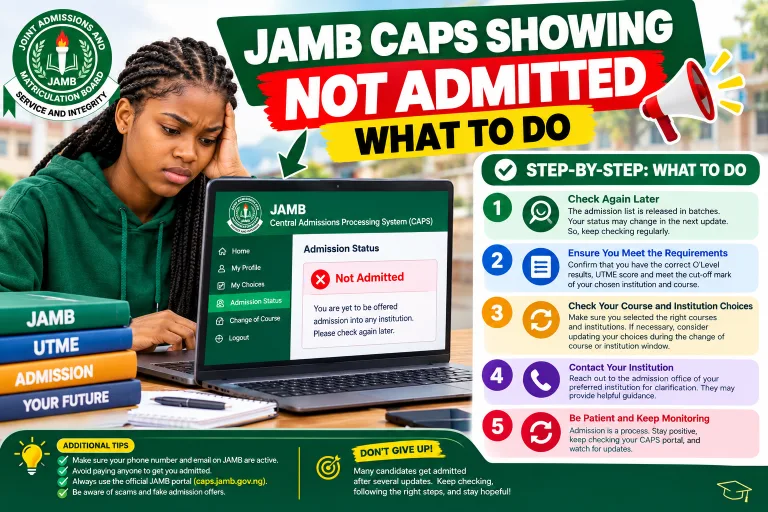
| Not Admitted | No approved admission offer is currently displayed. | Check for updates and verify that you have met the requirements. |
| Admission in Progress | Your admission may still be undergoing processing or approval. | Monitor CAPS and your institution’s official portal. |
| Awaiting Admission | The wording may indicate that a decision has not yet been finalised. | Read the school’s instructions and continue checking official updates. |
| Transfer Approval | You may have a course-transfer proposal to review. | Open the relevant CAPS section and carefully review the proposal before responding. |
| No Record Found | The portal could not find a matching record using the information supplied. | Recheck your details, session and the institution’s instructions. |
The precise wording and available options may vary between systems. These messages should be interpreted in the context of the portal displaying them.
If your school says you have been admitted but CAPS still shows “Not Admitted” or “Admission in Progress”, do not assume that the difference is permanent. JAMB’s official support guidance explains that an institution’s recommendation, O’Level result verification and other approval steps can affect when an offer appears on CAPS.
How to Check Your Name on a Downloaded Admission List
Some institutions publish admission lists as PDF documents instead of providing a search form.
Here is how to check your name on a downloaded list.
-
Visit your school’s official website.
-
Open the relevant admission announcement.
-
Download the correct 2026/2027 admission list.
-
Open the PDF using your phone’s PDF reader or a computer.
-
Use the search function to enter your JAMB registration number.
-
If that does not work, search for your full name.
-
Confirm that the course, batch and academic session are correct.
Searching with your registration number is often more reliable than searching with your name because different candidates may have similar names.
If the document is a scanned image rather than searchable text, you may need to zoom in and inspect the relevant pages manually. You can also check whether the school provides a searchable version.
Never rely on an old PDF circulating on social media without verifying that the institution published it.
How to Check Admission List for Universities in Nigeria
University admission lists are usually available through the university’s official website or undergraduate admission portal. Some universities publish merit lists first and follow with additional batches, while others use a candidate login page.
To check a university admission list for 2026/2027:
-
Visit the university’s official website.
-
Open the undergraduate admission section.
-
Look for the latest admission announcement.
-
Select the correct session and admission batch.
-
Search for your name or JAMB registration number.
-
Check your admission status on JAMB CAPS.
-
Follow the university’s instructions for acceptance and registration.
For example, the University of Nigeria, Nsukka (UNN) has an official website where it publishes admission-related announcements, while Osun State University (UNIOSUN) has announced its 2026/2027 UTME merit admission list through its official website.
These examples are provided to demonstrate where official updates can be found. They do not mean that all university admission lists are available or that every candidate has received a decision.
How to Check Admission List for Polytechnics in Nigeria
Polytechnics may offer National Diploma (ND), Higher National Diploma (HND) and other programmes. The admission process depends on the programme and institution.
For candidates applying for ND admission through the 2026 UTME, follow these steps:
-
Open the official website of the polytechnic.
-
Visit the Admissions or Prospective Students section.
-
Select the appropriate 2026/2027 admission exercise.
-
Enter your JAMB registration number or application details if requested.
-
Check the admission decision displayed.
-
Confirm your status through JAMB CAPS where applicable.
-
Complete the institution’s required acceptance and registration steps.
Do not assume that every HND or other non-UTME programme uses the same process as ND admission through JAMB. Follow the requirements published for your specific programme.
How to Check Admission List for Colleges of Education
Colleges of education offer programmes such as the Nigeria Certificate in Education (NCE), degree programmes in affiliated institutions and other approved courses.
To check your admission list:
-
Visit the official college website.
-
Open the relevant admission page.
-
Select the correct academic session and programme.
-
Search for your name or application number.
-
Follow the instructions provided for confirming admission.
If your programme is processed through JAMB, check your JAMB admission record as well. For other programmes, follow the official admission procedure specified by the institution.
Candidates should also confirm that they applied for the correct programme. An NCE admission list, for example, may be separate from a degree programme’s list even when both programmes are offered by the same institution.
What to Do If Your Name Is Not on the 2026/2027 Admission List
Finding out that your name is missing from an admission list can be disappointing. However, it does not always mean that you have been rejected.
Some institutions release admission lists in stages, and other candidates may receive offers later. The important thing is to identify the possible cause and take the appropriate action.
1. Confirm That the Admission List Has Been Released
Check the school’s official website to confirm that the relevant list is available. If only the first batch has been released, your name may appear in a later batch if you are subsequently selected.
Do not rely on a social media post claiming that the school has completed admissions unless the institution has confirmed it.
2. Check Your JAMB CAPS Status
Log in to your JAMB account and check your admission record. Your school’s portal and CAPS may not display updates at precisely the same time.
If your status remains “Not Admitted”, keep checking official updates while the admission exercise is ongoing.
3. Confirm Your O’Level Result Upload
Candidates who use WAEC, NECO, NABTEB or another accepted qualification should ensure that their results have been uploaded and are correctly reflected in their JAMB record.
JAMB’s CAPS information identifies the upload of O’Level results as an important part of the admission process.
If you discover a problem, follow JAMB’s official instructions or visit an accredited CBT centre where appropriate.
4. Review Your Admission Requirements
Check whether you met the requirements for your chosen institution and course. These may include subject combinations, required O’Level credits, screening participation and other programme-specific conditions.
Meeting a general JAMB score requirement does not automatically guarantee admission. Institutions also consider their approved admission criteria and available spaces.
For the latest general admission policy, visit the official JAMB website.
5. Check Whether You Need to Review a Course Transfer
In some circumstances, CAPS may present a transfer proposal for a candidate to move to another course. If such a proposal appears, read the details carefully before making a decision.
Do not accept a different course unless you understand the programme and genuinely wish to pursue it. If the proposal is unclear, seek clarification through the official JAMB or institution support channels.
6. Contact the Admissions Office if Necessary
If you believe there is an error in your record, contact the admissions office using the contact details published on the institution’s official website.
Provide the relevant information, such as your JAMB registration number and application reference, through an appropriate official channel. Never post sensitive login information publicly.
7. Avoid Paying for Fake Admission Assistance
Do not pay an individual who claims they can insert your name into an admission list, change CAPS status illegally or guarantee an admission offer.
Admission decisions must be confirmed through the relevant official systems. A payment receipt, screenshot or message from an unofficial agent is not proof of admission.
How to Confirm That Your Admission Is Genuine
After finding your name on a list, take a few additional steps to verify the offer.
-
Check the institution’s website. Make sure the admission announcement or portal belongs to the school you applied to.
-
Confirm the programme. Ensure that the course and admission category match the offer you received.
-
Check JAMB CAPS. For admissions processed through JAMB, verify your status using your own account.
-
Review the acceptance instructions. Confirm the deadline, payment method and registration requirements from the institution.
-
Keep your records. Save relevant official notifications, receipts and admission documents securely.
You should also understand the difference between an admission offer and full registration. Receiving an offer does not necessarily mean that you have completed all requirements to become a fully registered student.
JAMB also operates a separate Matriculation List service. Candidates should follow JAMB’s instructions on admission documentation and matriculation-list requirements when applicable.
Common Problems When Checking Admission Lists
| Problem | Possible reason | Recommended action |
|---|---|---|
| Website is not opening | Heavy traffic, maintenance or internet problems | Try again later or check your connection. |
| Registration number is rejected | Incorrect details or wrong admission session | Check the number and confirm the selected session. |
| Name is missing from the PDF | The list may be incomplete or your name may not be included in that batch | Check other official batches and your individual status. |
| CAPS shows “Not Admitted” | No approved offer is displayed yet | Monitor official updates and check your eligibility. |
| School portal shows admission but CAPS does not | The admission may still be undergoing recommendation or approval | Contact the school if the discrepancy persists. |
| Login details are not working | Forgotten password or account issue | Use JAMB’s official recovery and support options. |
| Payment page looks suspicious | The link may be unofficial or fraudulent | Stop and confirm the payment instructions on the school’s official website. |
If the portal is temporarily unavailable, avoid repeatedly submitting forms or making unnecessary payments. Wait and try again through the official website.
Important Tips for Candidates Checking Admission List in 2026/2027
Keep these points in mind throughout the admission exercise:
-
Check your admission status regularly, but do not assume that it must change every day.
-
Use the official website of your institution and JAMB.
-
Ensure that your JAMB profile information and O’Level results are correct.
-
Read admission announcements carefully, especially those covering deadlines.
-
Do not confuse screening registration with an admission offer.
-
Check the institution and course before accepting an offer.
-
Keep your JAMB password and other account credentials private.
-
Do not make acceptance-fee payments through unverified links.
-
Follow up with the admissions office if you discover a genuine error.
-
Save your admission documents and payment receipts for future reference.
Frequently Asked Questions About How to Check Admission List
1. How can I check my admission list for 2026/2027 in Nigeria?
Visit the official website of your chosen institution, open the admission section, select the 2026/2027 session and search using your JAMB registration number or other requested details. Then check your admission record on JAMB CAPS if your programme is processed through JAMB.
2. Is the 2026/2027 admission list out?
Some Nigerian institutions have published admission lists for the 2026/2027 session, while others may still be processing applications. Check the official website of your institution for the latest information.
3. How do I check my admission status on JAMB CAPS?
Visit JAMB e-Facility, sign in with your registered details and open the relevant admission service. Follow the instructions displayed to view your admission status.
4. Can I check my admission list with my phone?
Yes. You can use a smartphone and a web browser to visit your school’s admission portal or JAMB e-Facility. If a page does not display properly, try another browser or use a computer.
5. Is checking the admission list free?
Viewing a publicly available admission list is generally free. Some institutions charge authorised fees for separate services, such as screening registration, acceptance or clearance. Check the official fee schedule before making any payment.
6. What does “Not Admitted” mean on JAMB CAPS?
It means that an approved admission offer is not currently displayed on your CAPS record. Your application may still be under consideration, depending on the stage of the admission exercise. It does not guarantee that you will receive admission later.
7. What should I do if my name is not on the admission list?
Confirm that you are checking the correct session and batch. Then review your JAMB CAPS status, verify your O’Level result upload and check the institution’s admission requirements. Contact the admissions office if you need clarification.
8. Can I be admitted if my name is not on the first-batch list?
Yes, it is possible. Some institutions publish additional batches or supplementary lists. However, appearing on a later list is not guaranteed, so continue monitoring official announcements.
9. What is the difference between a school admission list and JAMB CAPS?
A school admission list is published by the institution, while JAMB CAPS is the central system used by JAMB to process and record admissions. For JAMB-regulated admissions, candidates should verify their offers through both relevant official channels.
10. Can I check admission without my JAMB registration number?
Some institutions allow candidates to search by name or application number, while others require a JAMB registration number. Follow the method provided by your institution. To check your own JAMB admission record, use the official account and identification details requested by JAMB.
11. What should I do if my school offers me admission but CAPS says “Not Admitted”?
Check that your O’Level results are uploaded and verify whether the institution has completed its recommendation and approval process. JAMB’s support guidance identifies these as possible reasons for a delay. If the difference continues, contact the school’s admissions office or JAMB through official support channels.
12. How do I know if my admission is genuine?
Confirm the offer on your institution’s official portal and, where applicable, on JAMB CAPS. Check the institution, course and admission session, and follow the official acceptance instructions. Do not rely solely on screenshots or messages from unofficial agents.
13. Can I accept admission on my phone?
Yes, if the official JAMB service is accessible on your phone and the relevant action is available for your account. Read the offer carefully before accepting or rejecting it.
14. What happens after I accept admission on JAMB CAPS?
Follow the institution’s instructions for acceptance fees, admission-letter printing, document verification, clearance and registration. Requirements and deadlines differ between schools.
15. How often should I check my admission status?
Check regularly during the admission period and pay attention to official announcements from JAMB and your institution. There is no need to refresh the page constantly; what matters is responding promptly when an offer or deadline is announced.
16. Can someone help me secure admission by paying them?
Be cautious. No unofficial agent can legitimately guarantee that your name will be added to an admission list or that your CAPS status will be changed. Use official application and support channels, and avoid sharing your password.
17. Does passing JAMB guarantee admission?
No. Admission depends on the applicable entry requirements, the institution’s selection process, available spaces and other approved criteria. Candidates must also complete the required screening and documentation processes.
Conclusion
Knowing how to check admission list for 2026/2027 in Nigeria is essential for every candidate seeking admission into a university, polytechnic or college of education. The process is straightforward once you know where to look and which details to provide.
Start by visiting your institution’s official website, checking the relevant admission list and searching for your name or JAMB registration number. After that, log in to the official JAMB e-Facility portal to confirm your admission status through CAPS where applicable.
If your name is missing, do not panic or assume that your application has been rejected. Check whether the relevant list has been released, verify your O’Level result upload and continue monitoring official announcements. If you receive an offer, confirm the institution and course, respond within the stated deadline and complete all required registration steps.
Most importantly, protect your personal information and avoid unofficial agents who promise guaranteed admission. Your safest source of admission information is your institution’s official website and JAMB’s recognised platforms.
For more information about admission updates, JAMB CAPS, school fees and scholarship opportunities, visit MyEduWise.com.ng and explore the latest guides for Nigerian students.