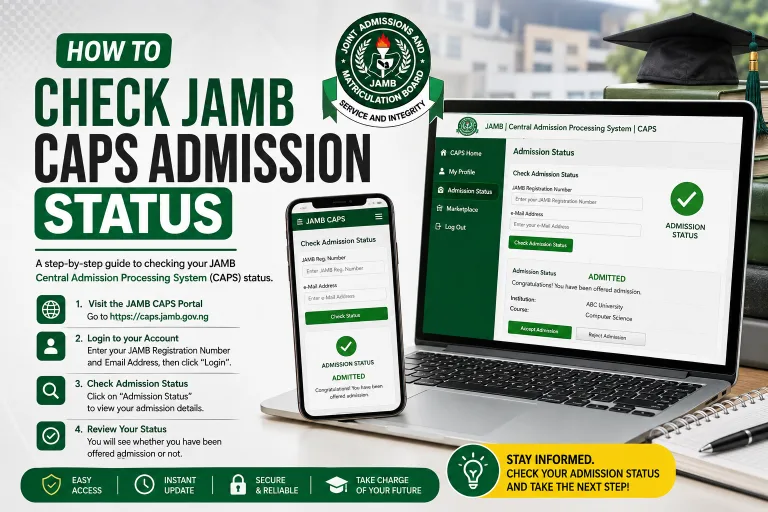
Understand JAMB CAPS admission status for 2026/2027, including Admitted, Not Admitted, Admission in Progress and transfer approval, plus what to do next.
Checking your admission status is one of the most important steps after writing the Unified Tertiary Matriculation Examination (UTME) or applying for Direct Entry admission in Nigeria. However, many candidates become confused when they log in to the Joint Admissions and Matriculation Board (JAMB) Central Admissions Processing System (CAPS) and see messages such as “Not Admitted”, “Admission in Progress” or “Admitted”.
If you are among the candidates seeking admission for the 2026/2027 academic session, understanding the meaning of these messages will help you make the right decisions and avoid mistakes that could affect your admission.
The JAMB CAPS admission status tells you what the system currently records about your admission process. Depending on your situation, the message may indicate that you have received an admission offer, that your admission is still being processed, or that no offer has been recorded for you at the time of checking.
JAMB explains that CAPS was introduced to automate the admission process, improve transparency and allow candidates to confirm admission offers. It also helps institutions process admissions and enables candidates to accept or reject offers through the official system.
You can read more about the system on the official JAMB CAPS website.
In this guide, we explains the meaning of the common JAMB CAPS messages for the 2026/2027 admission session, what candidates should do after seeing each message, how to resolve common problems and how to protect their admission opportunities.
What Is JAMB CAPS?
JAMB CAPS stands for Central Admissions Processing System. It is the platform established by JAMB to manage and monitor admissions into Nigerian tertiary institutions.
These institutions include universities, polytechnics, colleges of education and other institutions participating in the relevant JAMB admission process.
Before the introduction of CAPS, admission processing relied more heavily on manual procedures. CAPS was designed to improve transparency, reduce problems associated with multiple admissions and allow candidates to confirm offers made to them.
Under the system, institutions process candidates according to their admission requirements and submit the necessary recommendations for approval. Candidates can then check their records and respond to admission offers when the relevant options become available.
According to JAMB’s official explanation of CAPS, admission processing can take place in batches or through other approved processing arrangements. Therefore, candidates may receive updates at different times.
You can access your candidate account through the official JAMB e-Facility portal.
Difference Between JAMB e-Facility and CAPS
Although people sometimes use the names interchangeably, JAMB e-Facility and CAPS are not exactly the same thing.
| Platform or term | Meaning |
|---|---|
| JAMB e-Facility | The online portal where candidates access various JAMB services. |
| JAMB CAPS | The admission processing system through which candidates can view relevant admission information and respond to offers. |
| Admission status | The message showing the current position of your admission record. |
| Admission letter | The official document candidates can obtain after completing the required admission acceptance process. |
| Institution’s admission portal | The school’s own website for admission announcements, screening, registration and related services. |
Understanding these differences will help you know where to check your admission and which portal to use for a particular task.
JAMB CAPS Admission Status Meaning for 2026/2027 Candidates
The meaning of a message depends on what is currently recorded in your profile and the stage your institution has reached in processing your application.
The table below provides a quick explanation of common messages and situations candidates may encounter.
| CAPS status or message | General meaning | Recommended action |
|---|---|---|
| Admitted | An admission offer has been recorded for you. | Confirm the institution and course, then follow the acceptance instructions. |
| Not Admitted | No admission offer is currently recorded as approved for you. | Check your eligibility and continue monitoring official updates. |
| Admission in Progress | The admission process has not yet reached its final displayed outcome. | Check again later and follow up with your institution if necessary. |
| Recommended or awaiting approval | Your admission may be undergoing institutional or JAMB review, depending on the status displayed. | Wait for the next official update. |
| Transfer Approval | A proposed change of course may require your response. | Review the proposed programme before deciding. |
| No admission record or status unavailable | The portal has not displayed a usable admission result. | Confirm your details and try again, or contact official support. |
| Accept Admission option available | An offer is available for you to respond to. | Check the details carefully before accepting. |
Important: This table explains the general meaning of common admission messages. The exact wording and options available on your dashboard may vary. Do not treat a status that is still being processed as a confirmed admission offer.
1. What Does “Admitted” Mean on JAMB CAPS?
If your JAMB CAPS admission status shows “Admitted”, it means that an admission offer has been recorded for you on the system.
This is encouraging news for a candidate seeking admission for the 2026/2027 academic session. However, you should still complete the required steps rather than stopping after seeing the message.
What should you do if CAPS shows Admitted?
Follow these steps:
- Log in to your official JAMB e-Facility account.
- Open the admission status or CAPS section.
- Confirm the institution that offered you admission.
- Check the course or programme offered.
- Read the available instructions carefully.
- Accept the offer if you genuinely want it and the acceptance option is available.
- Follow your institution’s instructions for screening, acceptance fees and registration.
- Obtain your JAMB admission letter when it becomes available after completing the necessary steps.
Do not assume that accepting admission on CAPS automatically completes your school’s registration. Your institution may require additional documents, payments or screening procedures.
Also, be careful when checking the course offered. If you applied for one programme but CAPS displays another, confirm the details before accepting the offer.
For a step-by-step explanation, read our related guide: How to Accept Admission on JAMB CAPS for 2026/2027.
2. What Does “Not Admitted” Mean on JAMB CAPS?
“Not Admitted” means that an approved admission offer is not currently displayed for you on CAPS.
This message often worries candidates because they may believe it means they have permanently lost their chance of gaining admission.
However, seeing “Not Admitted” does not automatically mean you will never be admitted.
The institution may still be processing applications, may not yet have forwarded your admission recommendation, or may be preparing another batch of admissions. Your application may also require further checks, or you may not meet one or more requirements for the course you selected.
The message alone does not tell you which of these situations applies to your case.
What should you do if CAPS shows Not Admitted?
Do not panic or immediately conclude that the admission exercise is over.
Instead, take the following steps:
- Confirm that you selected the correct examination year.
- Check your school’s official admission portal for updates.
- Confirm that you meet the general and course-specific admission requirements.
- Ensure that your required O’Level results have been uploaded to JAMB where applicable.
- Check whether your institution has published an admission list or screening notice.
- Monitor your CAPS profile for changes.
- Contact the institution’s admissions office if you need clarification about your application.
The official JAMB support knowledge base also advises candidates whose institutional admission has not reflected on CAPS to check their O’Level result upload, the institution’s recommendation process and any outstanding transfer approval.
You can consult JAMB’s official support and FAQ page for further assistance.
Does Not Admitted mean rejection?
Not necessarily. It means that no approved admission offer is currently reflected on the system.
A final rejection, failure to meet a requirement and a pending admission process are different situations. Do not assume which one applies without checking your institution’s requirements and official updates.
At the same time, do not assume that you are guaranteed admission simply because the exercise is ongoing. Keep checking, but make decisions based on verified information.
3. What Does “Admission in Progress” Mean on JAMB CAPS?
“Admission in Progress” generally means that the admission process has not yet reached a final outcome displayed on your candidate profile.
The institution may be reviewing candidates, completing an internal process or awaiting a necessary approval. The precise stage depends on your admission record.
JAMB’s admission process involves several participants, including the institution’s admission officials and the relevant JAMB approval process. Therefore, an application may require additional steps before the system displays an approved offer.
What should you do when you see Admission in Progress?
The best approach is to remain patient and monitor your account.
- Check your CAPS profile periodically.
- Confirm that your O’Level results and other required information are correct.
- Monitor the institution’s official website and admission announcements.
- Contact the admissions office if the status remains unchanged for an unusually long time or if the school has given you a specific reason to follow up.
- Avoid paying unofficial agents who promise to change your status.
There is no universal number of hours or days after which every candidate’s status must change. Processing times can differ between institutions, programmes and stages of admission.
If the status remains unchanged, it does not automatically prove that something is wrong. However, it is reasonable to confirm that there is no outstanding requirement on your side.
4. What Does “Recommended” or “Awaiting Approval” Mean?
Candidates may hear that their admission has been recommended even when the final offer is not yet displayed on their CAPS profile.
JAMB’s official admissions documentation describes different processing stages, including recommendation, approval and acceptance. These stages are not interchangeable.
A recommendation generally means that the institution has proposed a candidate for admission through the relevant process. Further checks or approval may still be necessary before a final offer becomes available.
If someone tells you that your name has been recommended, do not rely only on that statement. Check your official profile and confirm the information with the institution.
What should you do?
- Wait for the next official update.
- Check whether the institution has communicated any outstanding requirements.
- Confirm your admission details through the proper channels.
- Do not pay an agent to obtain an approval that should be processed through the official system.
A recommendation is a positive development, but it should not be treated as identical to a final, approved admission offer.
5. What Does Transfer Approval Mean on JAMB CAPS?
Transfer Approval relates to a proposed movement from one course or programme to another through the relevant admission process.
For example, an institution may propose that a candidate be considered for a different programme from the one originally selected. This can happen when the candidate’s application is being considered for an alternative course.
The proposal may require the candidate to review and respond through CAPS.
What should you do if a transfer proposal appears?
Read the proposed course carefully. Consider the programme’s subject requirements, your academic interests and your future plans.
If you are satisfied with the proposed course, follow the official instructions to respond. If you are unsure, contact the institution’s admissions office before making a decision.
Do not accept a transfer proposal simply because you think doing so guarantees admission to your preferred course. A transfer proposal and a final admission offer are different stages.
JAMB’s published admission guidelines explain that candidates may be notified when an institution proposes a movement to another programme. The candidate’s response can affect whether the movement proceeds.
You can consult the official JAMB admission guidelines for additional background, while following the current instructions displayed on your account.
6. What Does “No Admission Status Found” Mean?
If the portal cannot display your admission status, it may be because no result is available through that particular screen, the information entered is incorrect, or the system is experiencing a technical problem.
This message should not automatically be interpreted as a rejection.
Possible reasons
- You selected the wrong examination year.
- Your JAMB registration details were entered incorrectly.
- The institution has not yet submitted or completed the relevant admission processing.
- Your profile information needs to be checked.
- The portal is temporarily unavailable or has not refreshed your latest information.
How to resolve the problem
First, confirm your examination year and registration number. Then sign out and log in again through the official portal.
If the problem continues, try again later using a reliable internet connection. You can also seek assistance through JAMB’s official support channels or your institution’s admissions office.
Do not share your password or verification codes with strangers who claim they can retrieve your status.
7. What Does It Mean When Accept Admission Is Available?
If the “Accept Admission” option is available, it generally means that the system is allowing you to respond to an admission offer.
Before accepting, check the institution and programme shown on the screen.
Accepting an offer is an important decision. If you have more than one admission interest, do not assume that you can accept an offer and automatically retain every other option. Follow JAMB’s current rules and seek clarification if you are unsure about the consequences.
If you decide to accept, follow the on-screen instructions and confirm that your response has been recorded.
After acceptance, check the availability of your JAMB admission letter and follow the school’s registration requirements.
8. What Does It Mean When Accept or Reject Admission Is Not Available?
Sometimes candidates open their CAPS profile but cannot select the acceptance or rejection option.
This may happen when no offer is available for the candidate to respond to, or when the relevant processing stage has not yet been completed. Technical or account-related problems may also need to be ruled out.
Do not repeatedly click inactive options or pay an unofficial person to activate them.
Instead, confirm the displayed status and follow the instructions on your profile. If the problem continues despite a confirmed offer, contact JAMB support or your institution’s admissions office.
How to Check JAMB CAPS Admission Status for 2026/2027
If you have not checked your admission status before, use the official JAMB e-Facility portal.
Step 1: Visit the JAMB e-Facility website
Open https://efacility.jamb.gov.ng/ in your browser.
Ensure that the website address is correct before entering your account details.
Step 2: Log in to your account
Enter the email address and password associated with your JAMB profile.
If you have forgotten your password, use the official password recovery option rather than relying on an unknown third-party website.
Step 3: Open the admission status section
Locate the admission-related service on your dashboard. Depending on the portal layout, you may need to select “Check Admission Status” and then access CAPS.
Step 4: Select the correct examination year
Choose the examination year associated with your 2026/2027 admission application where the portal requests it.
Enter your JAMB registration number if required.
Step 5: Access your CAPS profile
Select the option to access CAPS and wait for your admission information to load.
Step 6: Read the message carefully
Check whether the system displays “Admitted”, “Not Admitted”, “Admission in Progress” or another message.
Read the accompanying information and check whether any response or action is required.
Step 7: Take the appropriate action
If you have received an offer, confirm the details and follow the acceptance instructions.
If your status is still being processed, monitor your profile and check your institution’s official announcements.
If the status is unclear, contact an official support channel.
For more details, read our existing guide on How to Check JAMB CAPS Admission Status for 2026/2027.
Common Reasons Your JAMB CAPS Admission Status May Not Change
Your admission status can remain unchanged for several reasons. The correct response depends on your particular situation.
| Possible reason | What it may mean | What to do |
|---|---|---|
| Admission processing is ongoing | Your application has not reached a final displayed outcome. | Continue checking official updates. |
| O’Level result is missing | A required result may not be available on your JAMB profile. | Confirm the upload through the appropriate official channel. |
| Admission recommendation is incomplete | Your institution may still need to complete its processing. | Contact the school’s admissions office if necessary. |
| Course requirements are not met | You may not satisfy one or more programme requirements. | Check the current admission requirements. |
| Incorrect examination year | You may be checking the wrong admission record. | Select the correct year. |
| Technical problem | The portal may not be displaying information properly. | Retry later and contact official support if needed. |
| Transfer proposal awaits a response | Your profile may require a decision about a proposed course change. | Review the transfer section and follow official instructions. |
These are possible explanations, not a diagnosis of every candidate’s admission situation. Your institution or JAMB may need to review your individual record before the cause can be confirmed.
What to Do If Your School’s Portal Shows Admission but JAMB CAPS Says Not Admitted
This situation can be confusing, especially when a candidate sees their name on an institutional admission list but CAPS still displays “Not Admitted”.
One possible explanation is that the institution’s announcement and the CAPS record have not yet reached the same stage of processing. However, you should not assume that this is definitely the reason.
Take these steps:
- Confirm that your name, registration number and course are correct on the institution’s portal.
- Check whether the school describes the offer as provisional, recommended or final.
- Confirm that your required O’Level results are correctly uploaded to JAMB where applicable.
- Contact the institution’s admissions office and ask whether your admission has been formally forwarded through CAPS.
- Continue checking your official JAMB profile for changes.
Do not pay anyone who promises to synchronise the two portals for a fee outside an authorised process.
Read our related article: School Portal Shows Admission but JAMB CAPS Says Not Admitted.
Important Things Every 2026/2027 Candidate Should Know
Understanding your admission message is only one part of the admission process. You should also take the following precautions.
1. Check the official portal regularly
Check your profile periodically, particularly when your institution announces that admission processing or a new admission list is underway.
You do not need to refresh the page every few minutes. Follow official announcements and allow the system time to update.
2. Upload your O’Level results where required
JAMB’s CAPS information identifies the upload of awaiting O’Level results as an important part of admission processing.
If you used awaiting results during registration, confirm that your results have been uploaded correctly through an authorised process. Candidates who already supplied results should still verify that the necessary information is available on their profile.
3. Meet the requirements for your chosen course
Different programmes may have different subject combinations, O’Level requirements and other eligibility conditions.
Check the requirements for your intended institution and course rather than relying on another candidate’s experience.
4. Do not reject admission carelessly
Rejecting an offer may affect your options. Before selecting “Reject Admission”, ensure you understand the offer and the consequences of your decision.
If you are waiting for another institution, do not assume that the second institution will definitely offer you admission.
5. Protect your login details
Use only official JAMB websites to access your account. Avoid sending your password, one-time verification codes or sensitive account information to strangers.
6. Follow the school’s registration instructions
Even after accepting admission on CAPS, you may need to complete the institution’s screening, document verification, fee payment and registration processes.
Check the official school portal for the applicable instructions and deadlines.
Official Websites to Check for 2026/2027 Admission Updates
Candidates should rely on official sources when making admission decisions.
| Resource | What you can use it for | Official link |
|---|---|---|
| JAMB website | JAMB announcements and CAPS information | jamb.gov.ng |
| JAMB e-Facility | Candidate profile and admission-related services | efacility.jamb.gov.ng |
| JAMB CAPS | Access to the CAPS platform | caps.jamb.gov.ng |
| JAMB support | Help with admission and profile-related questions | support.jamb.gov.ng/faqs |
| Your institution’s website | School admission lists, screening and registration notices | Visit your institution’s verified official website |
For accurate information, use the current instructions published by JAMB and your institution. Do not rely entirely on screenshots, forwarded messages or social media posts that cannot be verified.
Frequently Asked Questions About JAMB CAPS Admission Status for 2026/2027
Below are answers to common questions Nigerian candidates ask about their JAMB CAPS admission status.
1. What does JAMB CAPS admission status mean?
JAMB CAPS admission status shows the current position of your admission record on JAMB’s Central Admissions Processing System. It may indicate that an admission offer is available, that your admission is still being processed or that no approved offer is currently displayed.
2. Does “Not Admitted” mean I will not gain admission for 2026/2027?
No. “Not Admitted” means that an approved admission offer is not currently displayed on your CAPS profile. It does not automatically mean that you have permanently lost your admission opportunity. Continue checking official updates, but remember that admission is not guaranteed.
3. What does “Admission in Progress” mean on JAMB CAPS?
It generally means that your admission process has not reached a final displayed outcome. Further processing or approval may be required. Monitor your CAPS profile and contact your institution if you need clarification.
4. What does “Admitted” mean on JAMB CAPS?
It means that an admission offer has been recorded for you. Check the institution and course carefully, then follow the official instructions for accepting the offer and completing your school’s registration requirements.
5. How often should I check my JAMB CAPS admission status?
You can check periodically, especially when your institution announces admission updates. There is no need to refresh the portal constantly. Follow official announcements and check your account regularly throughout the relevant admission period.
6. Why is my school admission list out, but my CAPS still says Not Admitted?
The school’s announcement and your CAPS record may not yet reflect the same stage of processing. Other issues may also be responsible. Confirm your details, check your O’Level result upload where applicable and ask the institution whether your admission has been forwarded through the official process.
7. Can my JAMB CAPS admission status change from Not Admitted to Admitted?
Yes, it can change if an admission offer is subsequently processed and approved for you. However, this is not guaranteed for every candidate. Your eligibility, institutional decisions and the progress of the admission exercise all matter.
8. What should I do if my CAPS shows Admitted but I cannot accept the offer?
First, confirm that the offer details are correct and check the instructions on your profile. If the acceptance option remains unavailable despite the displayed offer, contact JAMB support or your institution’s admissions office for assistance. Avoid paying unofficial agents to activate the option.
9. Is admission on my school’s portal the same as admission on JAMB CAPS?
Not necessarily. Your school’s portal and JAMB CAPS are separate systems that serve related purposes. If the two show different information, contact the institution to confirm the stage of your admission and follow the official process to resolve the discrepancy.
10. What does Transfer Approval mean on JAMB CAPS?
It usually relates to a proposed change from one course or programme to another. Review the proposed programme carefully and follow the instructions on your profile. If you do not understand the consequences of accepting or rejecting the proposal, ask your institution before making a decision.
11. Can I gain admission if my O’Level results have not been uploaded to JAMB?
Missing O’Level results may affect your eligibility for admission. JAMB identifies the upload of awaiting results as part of its admission process. Confirm the requirements for your application and ensure that your results are uploaded through an authorised process where necessary.
12. Can I accept admission on CAPS and still wait for another school?
Do not assume that accepting one offer allows you to retain every other admission option. Acceptance can affect your admission choices and the way your application is handled. Review the current JAMB instructions and seek clarification before accepting or rejecting an offer if you are waiting for another institution.
13. What should I do if my CAPS status has not changed for weeks?
Check your institution’s official admission announcements, verify your application details and confirm that you have met the relevant requirements. If the status remains unchanged and you are concerned, contact the institution’s admissions office or JAMB support. Do not assume that the delay means rejection or that admission is guaranteed.
14. Can I check JAMB CAPS admission status with my phone?
Yes. You can access the official JAMB e-Facility portal through a mobile browser. Log in using your registered account details and open the admission-related services. If the page layout is difficult to use, you can try your browser’s desktop-site option.
15. Is JAMB CAPS admission status free to check?
Candidates should access their admission information through JAMB’s official platforms. If you use an accredited centre or obtain assistance with an online service, confirm any applicable charges before paying. Avoid unofficial websites or individuals demanding money to reveal or change your status.
16. What should I do after accepting admission on CAPS?
Confirm that your acceptance has been recorded, check whether your JAMB admission letter is available and follow your institution’s instructions. You may need to pay an acceptance fee, complete screening, submit documents and register for your programme.
17. Does “Recommended” mean I have been fully admitted?
Not necessarily. A recommendation is part of the admission processing process and may require further review or approval. Wait for the official offer to appear on your CAPS profile and follow the instructions provided.
18. What should I do if I see an unfamiliar message on CAPS?
Do not guess its meaning or take an irreversible action. Read the message carefully, check JAMB’s official guidance and contact your institution or JAMB support if the meaning remains unclear.
Conclusion
Understanding the JAMB CAPS admission status for 2026/2027 can help you avoid unnecessary worry and make better decisions during the admission process.
If your status shows “Admitted”, verify the course and institution and follow the official acceptance instructions. If it displays “Admission in Progress”, allow the process to continue while checking for updates. If it shows “Not Admitted”, do not immediately conclude that your admission opportunity is over, but do not assume that an offer is guaranteed either.
Candidates who see a transfer proposal, an unavailable acceptance option or a discrepancy between their school portal and CAPS should confirm the situation through official channels before making a decision.
Most importantly, keep your JAMB profile details accurate, confirm that your required results have been uploaded, follow your institution’s admission requirements and protect your login information.
For reliable information, visit the official JAMB website, the JAMB e-Facility portal and your institution’s verified website.
At MyEduWise.com.ng, our aim is to help Nigerian students understand admission procedures and make informed academic decisions using clear, practical guidance. Bookmark this guide and return to it whenever you need to understand a message displayed on your JAMB CAPS profile.