In this guide, we explain how to accept admission on JAMB CAPS for the 2026/2027 admission session in simple language, step by step, with the current deadlines, common problems and the mistakes that cost candidates their admission. You have been told that you have been admitted. Maybe your school posted a list, maybe your uncle called to say “they have admitted you,” or maybe you saw a message on your phone. Before you celebrate or pay any money, there is one very important thing to do: confirm it on JAMB CAPS and accept it.
We prepared this article using information from the Joint Admissions and Matriculation Board (JAMB) and news reports of its recent statements. Where something is reported by blogs but not clearly stated by JAMB, we tell you so, so that you can always confirm on the official portal.
Quick Summary: How to Accept Admission on JAMB CAPS
If you are in a hurry, here is the short version:
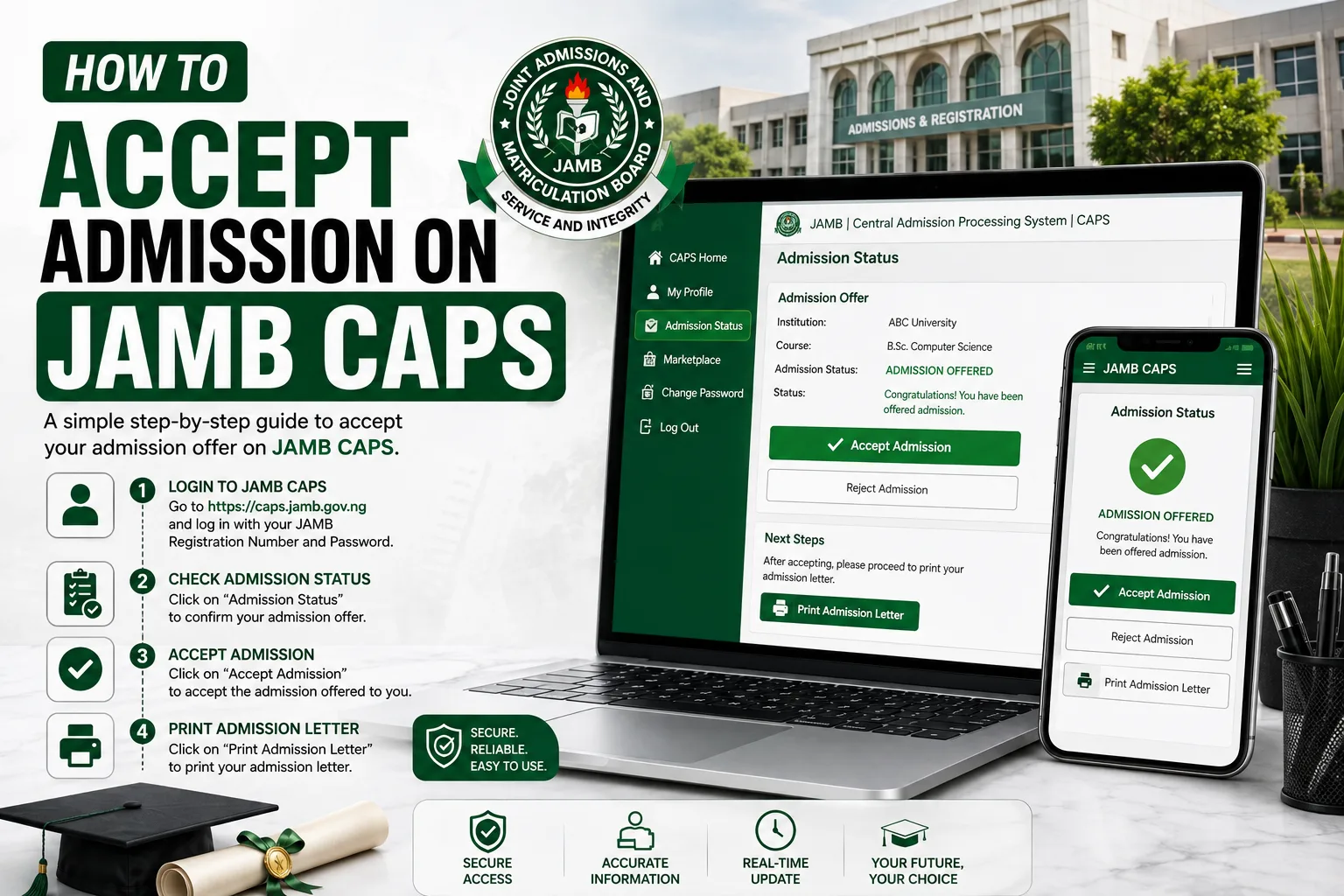
- Log in to your JAMB e-Facility account.
- Open Access My CAPS and click Admission Status.
- Read the school and course carefully.
- If you want the offer, click Accept Admission. If not, click Reject Admission.
- After accepting, go back to e-Facility and print your JAMB Admission Letter.
- Then follow your school’s own process for acceptance fee, screening and registration.
The rest of this article explains each step properly, so that you do not make mistakes.
What Is JAMB CAPS?
CAPS stands for Central Admissions Processing System. It is the platform JAMB uses to manage admissions into Nigerian universities, polytechnics, colleges of education and other tertiary institutions. Schools use it to recommend candidates for admission, and JAMB uses it to approve those recommendations. Candidates use it to check their admission status and to accept or reject offers.
The simple truth is this: an admission is only official when it shows on your CAPS dashboard. A school may publish a list on its website, but if your name is not on CAPS, you should be careful. Admission offers that do not pass through CAPS are not recognised by JAMB.
CAPS is a part of the JAMB e-Facility portal. The e-Facility is the general self-service portal where candidates do many things: check results, upload O’Level results, print admission letters, request change of course or institution, and more. CAPS is the section inside it that deals with admission.
| Term | What it means |
|---|---|
| JAMB | Joint Admissions and Matriculation Board, the body that conducts UTME and coordinates admission |
| e-Facility | JAMB’s self-service portal for candidates |
| CAPS | Central Admissions Processing System, the admission module inside e-Facility |
| Admission offer | An institution’s recommendation that JAMB has approved and shown on your CAPS |
| Accept | Your confirmation that you want the admission offered |
| Reject | Your decision to decline that admission |
Why You Must Accept Your Admission on JAMB CAPS
Some candidates think that once the school admits them, everything is finished. That is not correct. Accepting on CAPS is the step that tells JAMB, “Yes, I want this admission.” Here is why it matters:
- It confirms your place. Without acceptance, your admission is not secured.
- It unlocks your admission letter. Reports from JAMB’s recent communication say candidates who accept can proceed to print their admission letters.
- It stops the school from losing your slot. Reported guidance says that once an offer is approved on CAPS, you have about four weeks to respond. After that, the school can ask for the admission to be removed and you may fall into what JAMB calls the “refusal to accept” category.
- It helps other candidates. When you hold an offer and do nothing, you block a space another candidate could use.
JAMB has also repeatedly advised candidates with pending offers to log in and either accept or reject immediately. In a video explainer shared on its social media pages, the Board told candidates to act with immediate effect when they see an offer.
Important Deadlines for 2026/2027
There are two different groups of candidates, and many people mix them up. Please read this table carefully.
| Group | What to do | Deadline |
|---|---|---|
| Candidates offered admission in the 2026/2027 exercise | Accept or reject promptly on CAPS. Reported guidance says you have about 4 weeks (28 days) after the offer appears. | Within the window after your offer shows |
| Candidates with old, unanswered offers from 2021 to 2025 | Log in to CAPS and accept or reject the old offer | 30 November 2026 (extended from 31 August, then 30 September 2026) |
According to JAMB’s statement shared on its X (Twitter) handle on 30 September 2026, any outstanding offer from 2021 to 2025 that is neither accepted nor rejected after 30 November 2026 will revert to “Not Admitted” on JAMB’s records. JAMB also warned that any later request to update such an admission will attract a penalty fee.
There is a useful clarification for candidates who have a new admission in 2026 but still have an old offer hanging on their account. JAMB said such candidates can reject the earlier offer without affecting their 2026 admission. So if you are in this situation, do not be afraid to clear the old one.
What You Should Do Before You Try to Accept Admission
Many candidates fail to see the Accept button because of small problems. Check these things first:
- Make sure your JAMB profile is working. You need your registration number or email and your password. If you forgot your password, use the reset option on the e-Facility before the day you need it.
- Check your O’Level result. Some guides advise that candidates confirm their O’Level results are uploaded on CAPS. If they are missing, your admission may not show properly. Upload or fix it through the correct JAMB channel.
- Use the correct phone number and email. The details on your profile should be the ones you still have access to.
- Have good data or a stable network. JAMB servers can be busy when admission lists are moving, so be patient and try at quieter times if the page is slow.
- Use only official links. Do not enter your details on any website that looks strange or promises “quick admission.”
How to Accept Admission on JAMB CAPS Using a Computer (Portal Method)
The portal method is the main and safest way to accept your offer. Follow these steps:
Step 1: Open the JAMB e-Facility. Go to JAMB’s official website and use the link to the e-Facility, or go directly to the e-Facility portal. Type the address yourself or use the link from the official website. Do not click links from strangers.
Step 2: Log in. Enter your email address and password. If it is your first time or you forgot the details, use the “Forgot password” option.
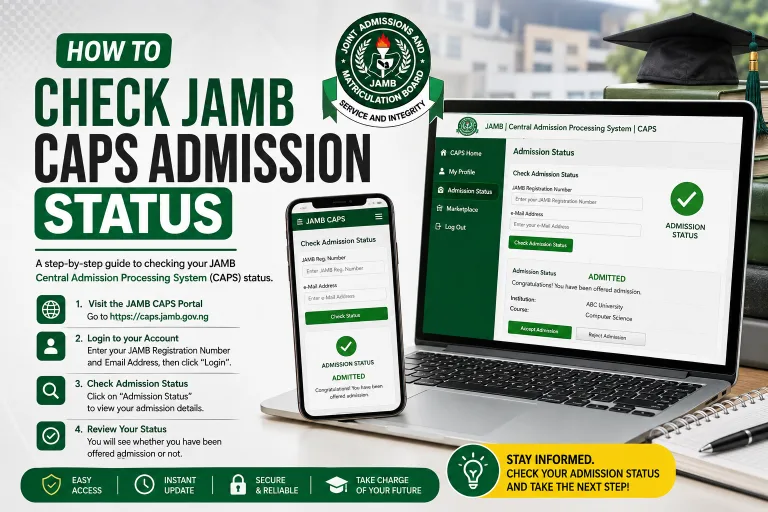
Step 3: Open Check Admission Status. On your dashboard, look for Check Admission Status. Select the admission year, 2026, and enter your registration number if the portal asks for it.
Step 4: Click Access My CAPS. This opens the full CAPS interface.
Step 5: Click Admission Status. Inside CAPS, click Admission Status. The page will show where you are in the process.
Step 6: Read the offer carefully. Look at the name of the institution, the course and the type of admission. Confirm that this is what you want.
Step 7: Click Accept Admission. If you are happy, select Accept Admission and confirm. If you do not want the offer, you can click Reject Admission.
Step 8: Print your admission letter. After accepting, return to the e-Facility and look for the option to print your JAMB Admission Letter. Save the PDF and print a few copies.
That is the whole process of how to accept admission on JAMB CAPS through the portal. It usually takes only a few minutes when the network is good.
How to Accept Admission on JAMB CAPS Using Your Phone
You do not need a laptop. A smartphone with a browser is enough.
- Open your phone browser (Chrome or any other).
- Visit the JAMB e-Facility and log in.
- Select Check Admission Status or open Access My CAPS.
- Tap Admission Status.
- When the offer appears, tap Accept Admission.
- Print or save your admission letter from the e-Facility.
If the page looks too small, switch your browser to “Desktop site.” This often makes the buttons easier to see.
Can You Accept Admission by SMS (55019 or 66019)?
Several guides report that JAMB candidates can accept or reject admission by sending an SMS from the same phone number used for JAMB registration to 55019 or 66019. Some of these guides say the message should be the word ACCEPT or REJECT, while others add the registration number after the word (for example, ACCEPT followed by your registration number).
Because different sources describe the format differently, and because JAMB can change its methods, we advise this: treat the portal as your main method. Use SMS only as a backup, and confirm the current format on JAMB’s official website or its verified social media pages before you send anything. Network charges may apply, and you should never send your details to any number that JAMB has not announced.
| Method | Where | Best for | Our advice |
|---|---|---|---|
| Portal (computer) | e-Facility > CAPS | Most candidates | Safest and clearest method |
| Portal (phone browser) | e-Facility > CAPS | Candidates without a laptop | Works well; use Desktop site if needed |
| SMS | 55019 or 66019 | Backup when portal is slow | Confirm the format with JAMB first |
| CBT centre or JAMB office | In person | Candidates who cannot access the portal | Last option if all else fails |
Understanding the Messages You See on CAPS
When you open your dashboard, you may see different messages. Many candidates panic because they do not understand them. Here is what they commonly mean, according to current guides and reports:
| Message on CAPS | Meaning | What you should do |
|---|---|---|
| Admission Offered / Admitted / Congratulations | An approved offer is available | Read it and accept or reject quickly |
| Admission in Progress | Your case is still being processed | Wait and check again; do not pay anyone |
| Recommended | The school has proposed you and JAMB is reviewing | Wait for approval |
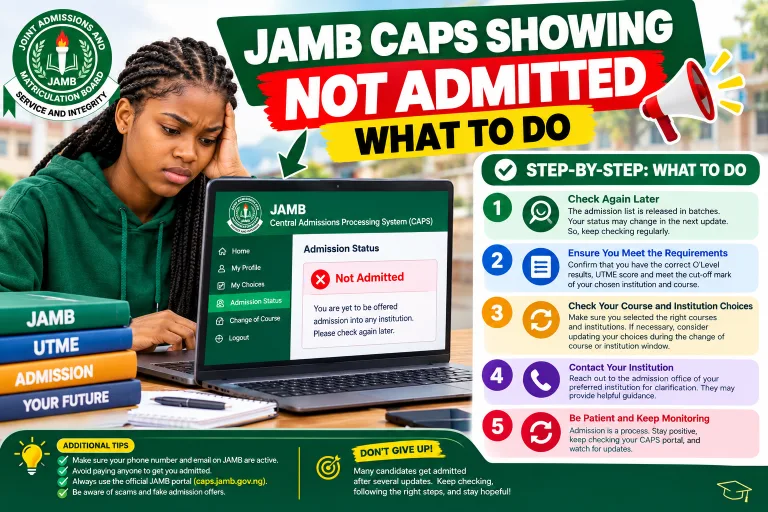
| Not Admitted | You do not currently have an offer | Keep checking; consider other options |
| No Admission Status found | Nothing has been recorded for you yet | Check your registration number and year |
Remember that CAPS usually changes after the school sends its list to JAMB for approval. So a school can publish a list today and your status may update a few days later. Do not rush to conclusions.
What to Do After You Accept Admission on CAPS
Accepting on CAPS is only one part of the process. After that, you must complete your school’s own requirements. Here is the usual order:
- Print your JAMB admission letter from the e-Facility.
- Check the school’s official portal for admission instructions.
- Pay the acceptance fee (if the school charges one) on the school’s official portal only.
- Upload or submit your documents such as O’Level results, birth certificate, local government identification and passport photograph.
- Attend screening or verification if your school requires it.
- Pay school fees and register your courses after you are cleared.
- Prepare for matriculation and orientation.
It is important to understand that JAMB does not charge a fee for simply clicking Accept on CAPS, according to current guides. The school, however, will ask you to pay its own acceptance and registration fees through its own portal.
What If You Do Not Want the Admission? How to Reject It
Sometimes the course or school is not what you wanted. In that case, you can click Reject Admission on CAPS. Think carefully before you do this, because a second offer is never guaranteed.
Before rejecting, ask yourself:
- Is this course close enough to my goals?
- Can I request a change of course or institution instead?
- Do I have another strong option?
- Will I be able to wait for another admission cycle?
If you want a different course or school, JAMB has a separate process for change of course or institution through the e-Facility. See our guide on JAMB change of course and institution for the steps. Do not accept an offer you do not intend to use, and do not leave it hanging, because a hanging offer can create problems for you later.
Common Problems When Accepting Admission on JAMB CAPS (and Solutions)
| Problem | Possible reason | What to try |
|---|---|---|
| Cannot see the Accept button | Admission is not yet approved, or your profile is incomplete | Check that your O’Level result and details are correct; wait and try again |
| Admission Status page will not load | Network or heavy traffic on JAMB servers | Try at night or early morning; switch network; clear browser cache |
| “Not Admitted” even though the school published your name | School list has not been approved by JAMB | Wait; check CAPS again in a few days |
| Wrong course or school shown | Mistake in recommendation | Do not accept blindly; contact the school and JAMB through official channels |
| Cannot log in | Wrong password or email | Use the password reset option |
| SMS not working | Wrong format or number not linked to your profile | Use the portal instead |
| Old offer from earlier years still showing | Unanswered admission from 2021 to 2025 | Accept or reject before 30 November 2026 |
If you try all these and nothing works, JAMB advice and reports say you can visit a JAMB-accredited CBT centre or a JAMB office to get help in person. Always carry your registration details and a means of identification.
Mistakes to Avoid When Accepting Admission on JAMB CAPS
- Waiting too long. Reported guidance says you have about four weeks. Do not wait until the last day.
- Paying before confirming on CAPS. Do not pay any school fees or “admission processing” money until your status clearly shows an offer.
- Trusting touts and agents. No one can “buy” you admission on CAPS. People who promise this are scammers.
- Clicking fake websites. Use only the official JAMB domain and your school’s official domain.
- Sharing your password. Never give your login details to anyone, not even a friend or a business centre operator you do not trust.
- Accepting without reading. Check the institution and course before you click Accept.
- Ignoring old offers. If you have a pending offer from 2021 to 2025, clear it before 30 November 2026.
How to Stay Safe from Admission Scams
Every admission season, many candidates lose money to fraudsters. Please remember these points:
- JAMB and Nigerian schools do not sell admission to individuals through social media inboxes.
- A school’s admission fee should be paid only on the school’s official payment portal.
- If someone says they can “push your name on CAPS,” stay away.
- Always verify news with the JAMB website or its verified pages.
- Report suspicious offers to the school and to JAMB.
Honest effort and correct steps are what protect your admission, not shortcuts.
Frequently Asked Questions (FAQs)
1. How do I accept admission on JAMB CAPS?
Log in to your JAMB e-Facility account, open Access My CAPS, click Admission Status, and select Accept Admission when your offer appears. After that, print your admission letter.
2. What is the deadline to accept admission on JAMB CAPS in 2026?
For candidates with outstanding offers from 2021 to 2025, JAMB has extended the final deadline to 30 November 2026. For 2026 offers, reported guidance says you have about four weeks after the offer appears, so you should act as soon as you see it.
3. What happens if I do not accept my admission on CAPS?
For old offers from 2021 to 2025, JAMB says they will revert to “Not Admitted” after 30 November 2026 if you do not accept or reject them. For new offers, delay can lead to the school asking for your admission to be removed, and you may be treated as having refused the offer.
4. Is there a fee to accept admission on JAMB CAPS?
According to current guides, JAMB does not charge a fee for clicking Accept on CAPS. Your school will, however, charge its own acceptance fee and other fees on its official portal. Late updates to old admissions after the deadline may attract a penalty fee, as JAMB has warned.
5. Can I accept admission on my phone?
Yes. You can use your phone browser to log in to the e-Facility and access CAPS. Some guides also mention SMS to 55019 or 66019, but confirm the exact format with JAMB first.
6. Why can I not see the Accept button on CAPS?
Usually it means your admission has not been approved yet, or your profile has a problem such as a missing O’Level result. Wait, check your details, and try again later.
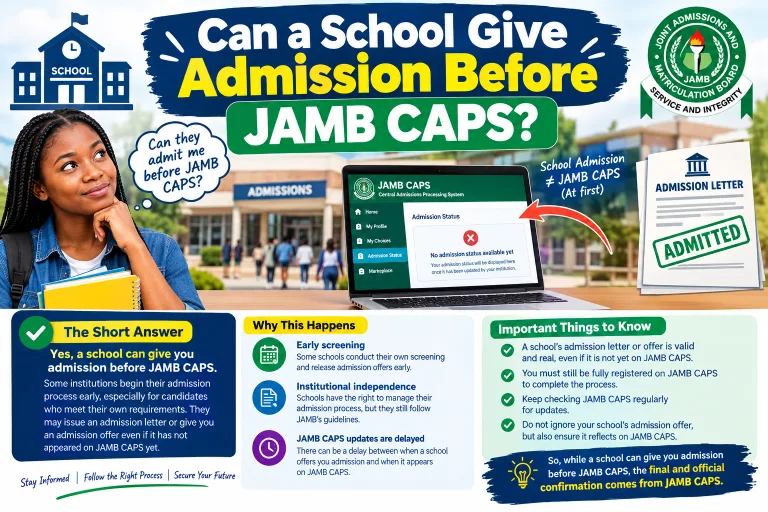
7. Can my school admit me without it showing on JAMB CAPS?
No. An offer that does not pass through CAPS is not valid. Confirm that the admission shows on your personal CAPS dashboard before you pay or resume.
8. I have a 2026 admission and an old offer from earlier years. What should I do?
JAMB has said you can reject the older offer without affecting your 2026 admission. Do this before 30 November 2026.
9. How do I print my JAMB admission letter?
After accepting your offer, log in to the e-Facility and use the option to print your admission letter. Save the PDF and print copies for your records and for your school.
10. Can I reject admission and still get another one later?
It is possible, but it is not guaranteed. Think carefully before rejecting. If you only want a different course or school, consider the change of course or institution process instead.
11. What does “Admission in Progress” mean?
It means your case is still being processed. It is not yet an approved offer, so you cannot accept yet. Keep checking, and do not pay anyone because of this message.
12. Should I pay school fees before I accept admission on CAPS?
No. First confirm that the admission shows on CAPS, accept it, and then follow your school’s official instructions on fees.
13. What if CAPS will not open at all?
Try another network or time, clear your browser cache, and use a different device. If the problem continues, visit a JAMB-accredited CBT centre or a JAMB office for help.
Conclusion
Knowing how to accept admission on JAMB CAPS is one of the most important parts of the admission process. The steps are simple: log in to e-Facility, open CAPS, check Admission Status, read your offer, click Accept, and print your admission letter. What makes the difference is acting on time, using only official channels, and avoiding people who want to collect money from you.
For the 2026/2027 session, remember the key dates. If you have an old offer from 2021 to 2025, you must accept or reject it before 30 November 2026, or it will revert to “Not Admitted.” If you have a new offer, do not delay, because the acceptance window is limited.
JAMB can update its rules, deadlines and methods at any time, so always confirm on the official JAMB website before you take action. Keep following MyEduWise for the latest admission news, school-by-school guides and step-by-step tutorials. For more help, read our guides on JAMB CAPS admission status, how to check admission lists and how to print your JAMB admission letter.