If you are searching for what to do if you forget your JAMB password, the first step is to identify the type of password you have forgotten. JAMB candidates may need to recover their e-Facility account password, their JAMB profile password, or the password for the email account they used during registration. These are different credentials, and the correct recovery method depends on the account you cannot access.
Forgetting your JAMB password during the 2026/2027 admission process can be frustrating, especially when you need to check your admission status, access your JAMB e-Facility account, print your admission letter, or use the Central Admissions Processing System (CAPS). The good news is that forgetting your password does not automatically mean you have lost your JAMB account or admission opportunity.
The Joint Admissions and Matriculation Board (JAMB) provides official online services and published guidance for password recovery. Candidates should use the official JAMB website, the e-Facility portal, and JAMB’s support channels rather than giving their login details to strangers or unofficial agents.
In this guide, you will learn how to reset your JAMB password, recover your profile password using SMS where applicable, handle a forgotten email password, troubleshoot common problems, and protect your account while completing your 2026/2027 admission process.
What to Do If You Forget Your JAMB Password: Quick Answer
If you have forgotten your JAMB e-Facility password, visit the official JAMB e-Facility login page, select “Forgot your Password?”, and follow the instructions displayed on the portal.
If you have forgotten your JAMB profile password, JAMB’s published FAQ provides an SMS recovery method: send PASSWORD followed by a space and your registered email address to 55019 or 66019 from the mobile number registered with JAMB. Check the current instructions and applicable charges before sending the message.
If the problem is that you cannot access your registered email address, recover that email account through its provider or contact JAMB through its official support channels if you cannot resolve the issue.
Important: Do not create another JAMB profile simply because you have forgotten your password. First, try to recover the original account.
Understanding the Different JAMB Passwords
Before resetting anything, make sure you know which password you have forgotten. This will help you avoid using the wrong recovery procedure.
| Account or credential | What it is used for | What to do if forgotten |
|---|---|---|
| JAMB e-Facility password | Accessing your candidate account and online services | Use the “Forgot your Password?” option on the official e-Facility portal. |
| JAMB profile password | Accessing services associated with your JAMB profile | Follow JAMB’s published profile-password recovery instructions. |
| Email account password | Opening the Gmail, Yahoo Mail, or other email account used during registration | Use the email provider’s official account recovery process. |
| CAPS login credentials | Accessing the Central Admissions Processing System | Use the recovery option on the official CAPS page and follow its current instructions. |
| JAMB registration number | Identifying your examination registration | Retrieve the registration number separately; it is not a password. |
The e-Facility portal and CAPS may have different login requirements or recovery procedures. Do not assume that resetting one password automatically resets every other account credential.
You can access the official JAMB e-Facility portal and the JAMB CAPS login page to identify the appropriate recovery option.
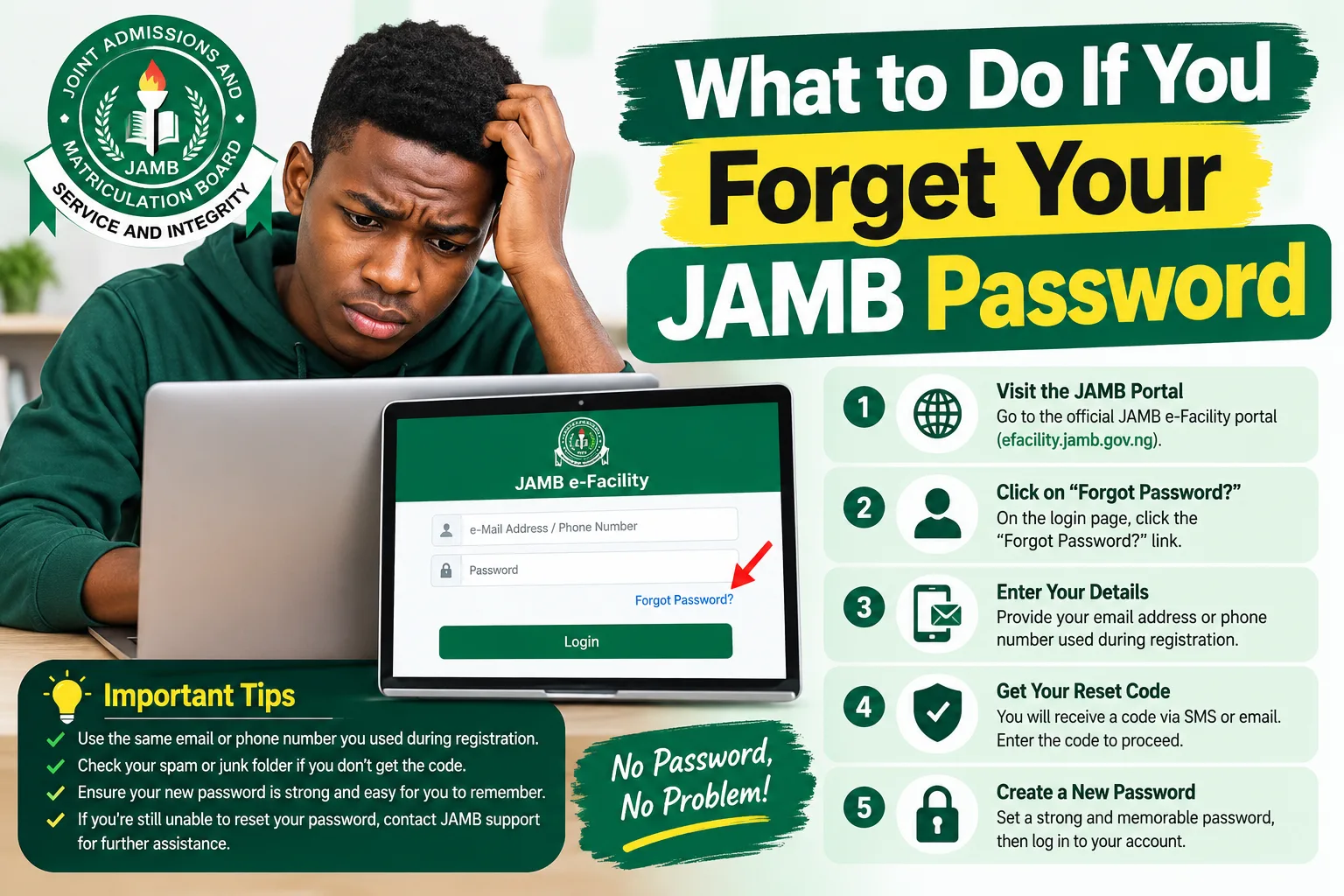
How to Reset Your JAMB e-Facility Password in 2026
The JAMB e-Facility portal allows candidates to access services connected with their examination records, profiles, and admission activities. If you cannot log in because you have forgotten your password, follow these steps.
Step 1: Open the Official JAMB e-Facility Portal
Visit:
https://efacility.jamb.gov.ng/
Confirm that the website address is correct before entering your email address or any other account information. Avoid links sent by unknown people through WhatsApp, SMS, Facebook, or unofficial websites.
The official login page displays fields for your email address and password, along with a password recovery option.
Step 2: Click “Forgot Your Password?”
On the login page, locate the “Forgot your Password?” option and click it.
This option is intended for candidates who cannot remember the password needed to access their e-Facility account.
Do not keep guessing your old password repeatedly. If you are unsure of it, use the recovery option instead.
Step 3: Follow the Instructions Displayed
The portal will provide the applicable password recovery instructions. Follow the prompts carefully and enter the information requested.
Depending on the recovery process available to your account, you may need to use your registered email address or follow a password-reset link or other instructions provided by JAMB.
Use the email address associated with your existing JAMB account. If you have multiple email addresses, do not randomly enter different addresses without checking which one you used during registration.
Step 4: Check Your Email Inbox
If the recovery process sends instructions to your email address, open the correct email account and look for the password-reset message.
Check these folders if the message does not appear in your main inbox:
- Spam or Junk.
- Promotions or other filtered folders, where available.
- All Mail or the general message list.
Make sure you have entered the correct email address. If the reset message has not arrived, wait a short while and check again before requesting another one.
Only open password-reset links that you requested through the official portal. Do not share a reset link with another person.
Step 5: Create a New Password
If the recovery process allows you to create a new password, choose one that is difficult for another person to guess.
A good password should:
- Be different from your old password.
- Avoid obvious details such as your name, date of birth, or phone number.
- Be unique to the account.
- Be stored securely so you can find it when needed.
Follow any password requirements displayed on the portal.
Step 6: Log In Again
Return to the official e-Facility login page and enter your registered email address and new password.
If the login is successful, open your dashboard and select the service you need, such as admission-related services or other available candidate facilities.
If the new password does not work, check whether you completed the recovery process successfully and whether you are using the correct account. Avoid creating another profile to solve a login problem.
Official source: JAMB e-Facility login and password recovery.
How to Recover Your JAMB Profile Password Through SMS
Some candidates confuse their JAMB profile password with the password used to log in to e-Facility. JAMB has published a separate SMS procedure for resetting a lost or forgotten profile password.
According to the official JAMB Frequently Asked Questions page, candidates can send the word PASSWORD, followed by a space and the email address associated with their JAMB profile, to 55019 or 66019 using the registered mobile number.
Follow these steps.
Step 1: Get Your Registered Mobile Number
Use the same mobile number associated with your JAMB profile.
If you have changed your SIM card or lost access to the original number, the procedure may not work from a different number. In that situation, contact JAMB through its official support channels for guidance.
Step 2: Confirm Your Registered Email Address
Check your registration slip, saved JAMB records, or other reliable records to identify the email address associated with your profile.
The email address should be entered correctly. An incorrect address may prevent you from following the intended recovery procedure.
Step 3: Compose the SMS
Use this format:
PASSWORD yourregisteredemail@example.com
Replace yourregisteredemail@example.com with the email address linked to your JAMB profile.
For example, if your registered email address is candidate123@example.com, the message would be:
PASSWORD candidate123@example.com
The example is illustrative only. Enter your own registered email address, not the example.
Step 4: Send the SMS to an Officially Listed Shortcode
JAMB’s published guidance lists 55019 and 66019 for this profile-password recovery procedure.
Send the message from your registered mobile number and follow any response you receive.
Before sending an SMS, ensure that you have sufficient airtime and check the current instructions from JAMB or your mobile network operator. Applicable SMS charges or service availability may vary.
Step 5: Follow the Instructions You Receive
Read any reply carefully. If additional action is required, follow the instructions provided through the official process.
If you receive an error message or no response, check the message format, registered email address, mobile number, and network service before trying again.
Do not send your password or other confidential account information to an unknown phone number claiming to be a JAMB agent.
Important Difference Between Profile Password and e-Facility Password
The SMS procedure above is specifically described by JAMB for a profile password. It should not be treated as a guaranteed replacement for the e-Facility website’s password-reset procedure.
If you are unable to log in to e-Facility, use the recovery option on the official e-Facility portal. If the issue concerns your profile password, follow the relevant JAMB profile-password guidance.
What to Do If You Forget Your JAMB Password on CAPS
The Central Admissions Processing System (CAPS) is JAMB’s platform for admission-related activities. Candidates use it to check their admission status and access relevant admission functions.
If you have forgotten your CAPS password, follow the instructions on the official CAPS website rather than assuming that the e-Facility password-reset process will solve the problem.
Steps to Reset Your CAPS Password
- Visit the official JAMB CAPS login page.
- Locate the “Forgot your password?” option on the login page.
- Click the password recovery link and carefully read the instructions displayed.
- Complete the requested recovery steps.
- If the portal instructs you to reset your password, follow that procedure before trying to log in again.
- Return to the CAPS login page and enter the required credentials.
The CAPS website has displayed security notices requiring some users to reset their passwords before accessing their accounts. Its instructions also explain that the reset process may involve an email address supplied by the candidate’s institution.
If the email address associated with your CAPS account is unknown or needs to be changed, the portal advises affected users to contact their institutional desk officer.
This is particularly important if you are a 2026/2027 admission candidate who can no longer access the email account associated with your CAPS login.
Official source: JAMB CAPS login and password recovery.
What If You Forget the Password of Your Registered Email Account?
Sometimes, the actual problem is not your JAMB password. You may remember your JAMB login details but be unable to open the email account you used during registration.
For example, you might have forgotten your Gmail password or lost access to an old Yahoo Mail account.
In this situation, recover your email account through its official provider.
If You Use Gmail
Visit Google Account Recovery.
Follow the instructions to verify that you own the account. Depending on your account settings, Google may ask you to confirm information or use an available recovery method.
If you successfully recover the email account, return to the JAMB portal and continue with the relevant password-reset process.
If You Use Yahoo Mail
Visit Yahoo’s official sign-in helper.
Enter the information requested and follow the available recovery instructions.
If you regain access to your email, check for any pending JAMB password-reset messages.
If You Cannot Recover Your Email Account
If you cannot recover the registered email address, do not immediately create another JAMB profile.
First, gather your registration slip, JAMB registration number if available, registered phone number, and any other records that can help establish ownership of your account.
Then contact JAMB through its official support channels and explain the problem.
For CAPS-specific login issues involving an institutional email address, contact the relevant institution’s admission office or desk officer as directed by CAPS.
Remember that recovering your email account and changing the email address attached to a JAMB profile are two different processes. The appropriate procedure depends on the particular account and problem.
What If You Have Forgotten Both Your JAMB Password and Email Password?
This situation can be stressful, but you should handle it one step at a time.
Use the following approach:
- Identify your registered email address. Check your registration slip, saved documents, or previous messages.
- Try to recover the email account. Use the official recovery service for Gmail, Yahoo Mail, or your email provider.
- Recover your JAMB login. Once you regain access to the email, use the e-Facility password-reset option.
- Use the profile-password SMS procedure if applicable. Follow JAMB’s official instructions for profile-password recovery.
- Contact JAMB if you remain locked out. Submit a support request explaining that you cannot access either the JAMB account or the registered email.
Do not send your full password, email password, ATM PIN, or banking details to someone claiming to help you recover your account.
If JAMB needs to verify your identity, follow the official instructions and provide only the information requested through its authorised channels.
What If You Have Lost Your Registered SIM Card?
The mobile number you used during JAMB registration may be important for profile-related services and SMS recovery.
JAMB’s published guidance states that candidates should use their registered mobile number for the profile-password recovery procedure. Therefore, a replacement SIM or a different phone number may affect your ability to complete recovery.
If your SIM card is lost, contact your mobile network provider to ask about recovering the same number through its official SIM-replacement process.
If you cannot recover the original number, contact JAMB for guidance on the available options for your particular situation. Do not assume that sending a recovery SMS from a new number will work.
You can also consult the official JAMB FAQ page for its published guidance on registered phone numbers and candidate profiles.
What If the JAMB Password Reset Link Is Not Working?
A password-reset link may fail to work for several reasons. It might have expired, the recovery request might not have completed successfully, or the browser may have opened an outdated page.
Try the following solutions.
| Problem | What you can do |
|---|---|
| The reset link has expired | Return to the official portal and request a fresh reset link if that option is available. |
| The page displays an error | Check the website address and try again later. |
| The link opens a blank page | Try another updated browser or open the official portal in a private browsing window. |
| The link opens an unfamiliar website | Close it and return to the official JAMB portal. |
| You cannot find the reset email | Check Spam, Junk, and other email folders. |
| The new password is rejected | Check the portal’s password requirements and repeat the official recovery process if necessary. |
| You have already used the reset link | Request a new one if the previous link cannot be reused. |
If you request several reset links, use the latest valid link sent by the official service. Older links may no longer work.
You should also check your internet connection and ensure that your browser is not automatically filling in an old password.
What If JAMB Says Your Email Address Is Incorrect?
If the portal rejects your email address, you may be entering a different address from the one linked to your JAMB account.
Here is what you should do:
- Check your JAMB registration slip or other saved registration records.
- Look through old emails or messages relating to your registration.
- Check whether you accidentally entered an extra space or misspelled part of the address.
- Confirm whether you are using the email linked to your JAMB profile rather than a different personal email.
- If the correct address is still not accepted, contact JAMB through its official support system.
Avoid creating a new profile with another email address as a shortcut. Your original candidate records may already be linked to the first profile, and creating additional accounts could complicate the situation.
JAMB’s published guidance encourages candidates to keep their profile details secure and use the appropriate official recovery process.
How to Contact JAMB If You Cannot Reset Your Password
If the normal recovery options fail, use JAMB’s official support channels.
Option 1: Use the JAMB Support Website
Visit the official JAMB Support Ticketing website.
Review the available frequently asked questions first. If your problem is not resolved, use the relevant support or enquiry option provided on the website.
When submitting a complaint, explain the exact problem. For example:
- You forgot your e-Facility password.
- The password-reset email is not arriving.
- Your registered email account is inaccessible.
- The profile-password SMS procedure is not working.
- You cannot access CAPS because the associated email address is unknown.
Include your name, relevant registration details, registered phone number, and supporting information where requested.
Do not post your password or sensitive identity information publicly.
Option 2: Use the Official JAMB Website
Visit JAMB’s official website and look for the current support or ticketing links.
Use the contact options listed on the official website instead of relying on unverified phone numbers circulated on social media.
Option 3: Visit a JAMB Office if Directed
If your issue requires additional verification or cannot be resolved online, ask JAMB support whether you need to visit a JAMB State Office or another designated office.
Take your available registration documents and identification if an office visit is required.
A cybercafé operator or CBT centre may be able to help you navigate a website, but you should not disclose your password to them. JAMB’s published guidance warns that candidates’ passwords should remain confidential and that centres should not demand them as a condition for providing services.
Will Forgetting Your JAMB Password Affect Your 2026/2027 Admission?
Forgetting your password does not automatically cancel your admission eligibility. However, it can prevent you from accessing online services until you recover your account.
For example, you may temporarily be unable to:
- Check your admission status on the relevant portal.
- Access your candidate dashboard.
- Complete certain admission-related online activities.
- Print documents available through your account.
- Review information linked to your candidate profile.
The exact services affected will depend on the account you cannot access.
If you are waiting for admission, take action as soon as you notice the problem. Do not wait until the last day of an admission deadline before attempting to recover your account.
Also, remember that resetting your password does not guarantee admission. Admission depends on the applicable requirements, institutional decisions, and JAMB’s admission processes.
If you want to confirm whether an admission offer is official, use the relevant JAMB admission services rather than relying only on an unofficial message or social media post.
Common Mistakes to Avoid When Recovering Your JAMB Password
Candidates sometimes make a password problem more complicated by taking the wrong steps. Avoid these mistakes during the 2026/2027 admission process.
1. Creating a New JAMB Profile
Do not create another profile just because you cannot remember your old password. Try the official recovery options first.
2. Using an Unofficial Website
Some websites imitate official portals or promise instant recovery. Always check the website address before entering your details.
3. Giving Your Password to a Cybercafé Operator
A person can help you navigate the portal without knowing your private password. Enter it yourself whenever possible.
4. Confusing Your Email Password With Your JAMB Password
These passwords belong to different accounts. Reset the password for the account you actually cannot access.
5. Using the Wrong Phone Number for SMS Recovery
JAMB’s published profile-password recovery procedure specifies the registered mobile number. Using a different number may not work.
6. Paying an Unverified Agent
Do not pay someone who promises guaranteed password recovery or admission. Use the official portal and support system.
7. Sharing Your OTP or Reset Link
An OTP or reset link may give another person access to your account. Keep both private.
8. Waiting Until the Admission Deadline
Recover your account early so that a technical issue does not interfere with an important admission activity.
How to Protect Your JAMB Account After Resetting Your Password
After recovering your password, take a few minutes to secure your account.
Use a unique password. Avoid using the same password for JAMB, your email, and social media accounts.
Save it securely. Use a reputable password manager or another secure method that you can access when necessary.
Protect your email account. If someone gains access to the email address linked to your JAMB profile, they may be able to interfere with account recovery.
Keep your registration documents. Store a copy of your JAMB registration slip and other relevant documents in a secure location.
Avoid public computers where possible. If you must use a cybercafé, do not allow the browser to save your password. Log out when finished and close the browser.
Verify every website. Use official JAMB links for login, admission, and support services.
Be careful with unsolicited messages. Do not trust people who claim that they need your password to check your admission status or improve your admission chances.
JAMB advises candidates to keep their passwords and other security details confidential. Treat your login credentials as private information.
Useful Official Websites for JAMB Candidates
The following resources can help you resolve account and admission problems.
| Website | What it is useful for |
|---|---|
| JAMB official website | Official announcements, examination information, and links to JAMB services. |
| JAMB e-Facility | Candidate login and available online services. |
| JAMB CAPS | Admission-related account access and CAPS services. |
| JAMB FAQ | Published guidance on profile passwords, phone numbers, and other candidate questions. |
| JAMB Support Ticketing | Official support information and assistance with unresolved issues. |
| Google Account Recovery | Recovery of a forgotten Gmail or Google Account password. |
| Yahoo Sign-in Helper | Recovery of a forgotten Yahoo Mail password. |
Frequently Asked Questions (FAQs)
1. What should I do if I forget my JAMB password?
Visit the official JAMB e-Facility portal and click “Forgot your Password?” Follow the instructions displayed to recover your account. If you have forgotten your profile password instead, consult JAMB’s official FAQ for the applicable recovery method.
2. Can I reset my JAMB password online?
Yes. The e-Facility login page provides a password recovery option. The exact steps depend on the account and the recovery instructions currently displayed by JAMB.
3. How can I recover my JAMB profile password through SMS?
JAMB’s published FAQ instructs candidates to send PASSWORD, followed by a space and their registered email address, to 55019 or 66019 from the mobile number registered with JAMB. Check the official instructions before sending the message.
4. Can I use another phone number to recover my JAMB profile password?
The published SMS procedure specifies the registered mobile number. If you no longer have access to that number, contact your mobile network provider about recovering it or ask JAMB for guidance through its official support channels.
5. What if I forget both my JAMB password and email password?
Recover your email account through its official provider first, if possible. Then return to the JAMB portal and follow the appropriate password-reset procedure. If you cannot recover the email account, contact JAMB for assistance.
6. How do I reset my JAMB CAPS password?
Visit the official CAPS login page and click the password recovery option. Follow the instructions provided. If the account requires an institutional email address that you cannot access, contact your institution’s relevant desk officer.
7. Why am I not receiving my JAMB password-reset email?
Possible reasons include an incorrect email address, a delayed message, or filtering by your email provider. Check your Spam and Junk folders, confirm the registered email address, and request another reset link if necessary.
8. Can I use my JAMB registration number instead of my password?
Not necessarily. A registration number identifies your examination record, while a password is used to authenticate access to an account. Follow the login requirements of the specific JAMB service you want to use.
9. Will forgetting my JAMB password affect my admission?
Forgetting your password does not automatically cancel your admission eligibility. However, it may prevent you from accessing important online services until you regain access. Recover your account promptly, especially when an admission deadline is approaching.
10. Should I create another JAMB profile if I cannot log in?
No. Do not create another profile simply because you forgot your password. Use the official recovery process first. If you cannot access your original profile, contact JAMB for assistance.
11. Can a cybercafé or CBT centre reset my JAMB password for me?
A centre may be able to guide you through the official process, but your password should remain confidential. Do not give anyone your password or allow an unverified person to take control of your account.
12. Is there a fee for resetting a forgotten JAMB password?
The applicable process and any charges depend on the service used. Do not assume that every recovery method is free or that an agent’s requested payment is legitimate. Check the current official instructions and your mobile network’s SMS charges before proceeding.
13. What should I do if the JAMB password-reset link has expired?
Return to the official portal and request a fresh reset link if that option is available. Use the latest valid link and follow the displayed instructions.
14. Can I change the email address linked to my JAMB profile?
Do not assume that you can change it through the ordinary password-reset page. The procedure depends on your account and the issue involved. Contact JAMB through its official support channels for guidance if you have lost access to the registered email address.
15. What should I do if I have tried everything but still cannot access my JAMB account?
Use the official JAMB support ticketing system, explain the problem clearly, and provide the supporting information requested. If the issue concerns CAPS and an institutional email address, contact your institution’s admission office or designated desk officer as appropriate.
Conclusion
Forgetting your JAMB password during the 2026/2027 admission process can be stressful, but there are official ways to address the problem. The most important step is to identify whether you have forgotten your e-Facility password, JAMB profile password, CAPS credentials, or email password.
For an e-Facility login problem, use the “Forgot your Password?” option on the official JAMB portal. For a forgotten profile password, follow JAMB’s published SMS recovery instructions using your registered phone number. If you cannot access the email account connected to your profile, recover it through the email provider or contact JAMB for further guidance.
Above all, avoid creating unnecessary duplicate profiles, sharing passwords with agents, or using unofficial recovery websites. Keep your login details secure and resolve account problems early so you can complete the necessary admission activities on time.
For reliable updates and more Nigerian admission guides, visit MyEduWise.com.ng and confirm important information through JAMB’s official website before taking action.