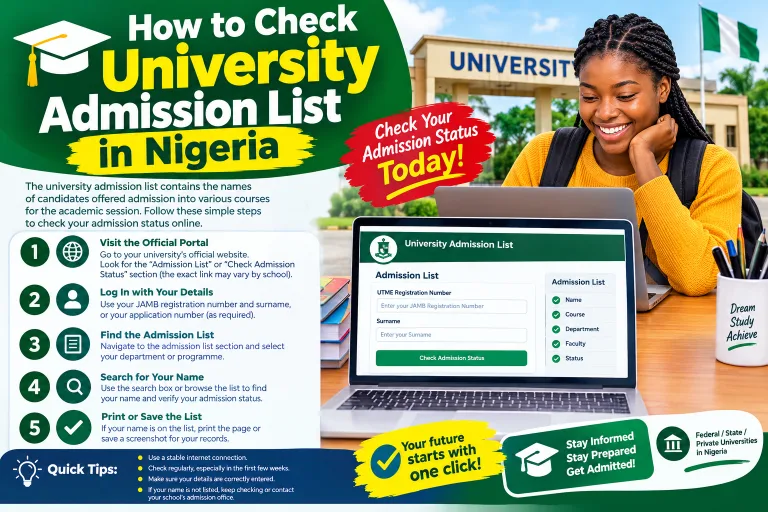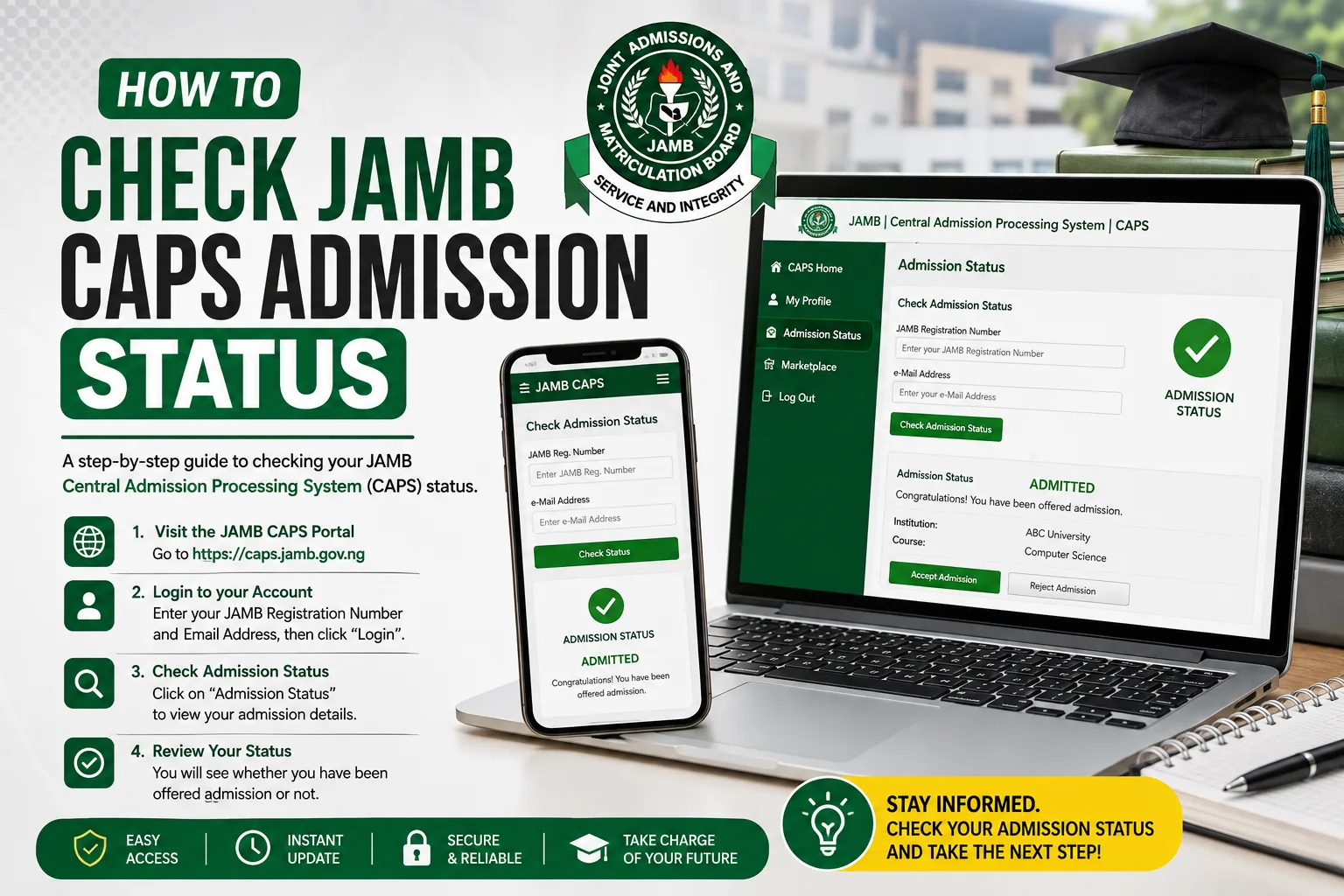
In this guide, we explains how to check JAMB CAPS admission status for the 2026/2027 academic session using a mobile phone or computer. You will also learn how to accept or reject an admission offer, understand different CAPS messages, solve common problems and protect your JAMB account from fraudsters.
Checking your admission status is one of the most important steps to take after sitting for the Joint Admissions and Matriculation Board (JAMB) examination. If you applied for admission into a Nigerian university, polytechnic, college of education or another JAMB-recognised institution, you need to know whether your admission has been offered, is still being processed or has not yet been approved.
The good news is that you can check your admission status online through the official JAMB Central Admissions Processing System (CAPS). You do not need to depend entirely on your school’s admission list or visit the institution before finding out what JAMB has recorded about your application.
The instructions below are based on information from JAMB’s official website and support resources. Since admission processing takes place in stages, candidates should always confirm their individual status directly on the official portal.
Quick Answer: How to Check JAMB CAPS Admission Status for 2026/2027
To check your admission status, follow these steps:
- Visit the official JAMB e-Facility portal.
- Log in with your registered email address and password.
- Locate the admission-status option on your dashboard.
- Select the appropriate examination year and provide your JAMB registration number if requested.
- Open the CAPS section to view your admission status.
- If you have received an admission offer, read the details carefully and follow the available instructions to accept or reject it.
You can also visit the official JAMB CAPS portal.
Important: Always confirm that you are using an official JAMB website before entering your login details. Do not share your password, profile code or other security information with strangers.
What Is JAMB CAPS?
JAMB CAPS means Joint Admissions and Matriculation Board Central Admissions Processing System. It is the official platform developed by JAMB to manage and process admissions into Nigerian tertiary institutions.
According to JAMB, CAPS was introduced to improve the admission process, make it more transparent and allow candidates to confirm provisional admission offers. It also helps institutions process admissions through an organised system.
The platform supports admission processing for eligible candidates applying to participating universities, polytechnics, colleges of education and other institutions under JAMB’s admission system. It allows candidates to check their status and respond to admission offers when the relevant options become available.
You can read more about the system on JAMB’s official CAPS information page.
Why Is JAMB CAPS Important?
JAMB CAPS is important for several reasons:
- Admission confirmation: It allows you to check whether JAMB has recorded an admission offer for you.
- Acceptance or rejection: Where the option is available, you can respond to an admission offer through the approved process.
- Admission transparency: It helps candidates follow the progress of admission processing.
- Transfer proposals: Eligible candidates may be able to view and respond to a proposed change of course through the relevant CAPS section.
- Official admission records: It helps ensure that admissions are processed through JAMB’s recognised system.
A school may publish a list of successful candidates, but you should still check your JAMB record and follow the official acceptance and registration procedures.
Requirements for Checking JAMB CAPS Admission Status
Before learning how to check JAMB CAPS admission status, prepare the information you may need to access your account.
| Requirement | Why you need it |
|---|---|
| Internet-enabled phone or computer | To access the official portal |
| Registered email address | To log in to your JAMB e-Facility account |
| JAMB account password | To access your dashboard |
| JAMB registration number | To identify your examination record when requested |
| Examination year | To view the correct admission session |
| Stable internet connection | To prevent interruptions while checking your status |
If you have forgotten your password, use the password-recovery option on the official portal rather than creating another account unnecessarily.
You should also confirm that your O’Level results have been uploaded to JAMB where applicable. JAMB’s official support guidance identifies missing or unverified O’Level results as one possible reason an institution’s recommendation may not yet appear as an approved admission.
How to Check JAMB CAPS Admission Status on a Phone
Many Nigerian candidates use Android phones or iPhones to check their admission status. You can use your phone’s browser to access the official website.
Follow these steps carefully.
Step 1: Open the Official JAMB e-Facility Portal
Open Chrome, Safari or another trusted browser on your phone.
Visit:
https://efacility.jamb.gov.ng/
Check the website address before proceeding. Avoid entering your details on unofficial websites that imitate the JAMB portal.
Step 2: Log In to Your JAMB Account
Enter the email address and password associated with your JAMB e-Facility account.
If you have forgotten your password, select the available password-recovery option and follow the instructions provided by JAMB.
Do not give your password to someone who promises to secure admission for you. Nobody can legitimately guarantee admission simply because they have access to your account.
Step 3: Find the Admission Status Option
After logging in, look through your dashboard for the option labelled Check Admission Status or a similar admission-related service.
The exact arrangement of dashboard options may change as JAMB updates its website. If you cannot find the option immediately, check the available services or use the official CAPS portal.
Step 4: Select the Appropriate Examination Year
If the system asks you to select an examination year, choose the year that applies to your application.
For the 2026/2027 admission session, candidates who sat for the 2026 UTME or applied through the relevant Direct Entry process should select the appropriate examination year for their application.
Do not select another year simply because it appears first in the list. Selecting the wrong year may cause confusion when you check your record.
Step 5: Open Your CAPS Admission Page
Follow the displayed instructions to access your admission record or the CAPS dashboard.
Depending on the page you open, you may be asked to enter your JAMB registration number or confirm other information.
Wait for the system to load before refreshing the page. If the website is temporarily slow, try again after a short period.
Step 6: Read Your Admission Status
Your dashboard will display the status currently available for your application.
You may see a message indicating that you have been admitted, that your admission is being processed or that no admission has been recorded for you yet.
Read the message carefully before taking action. If an admission offer appears, confirm the institution and course before accepting or rejecting it.
Step 7: Accept or Reject an Offer When Appropriate
If your admission has been offered and the acceptance or rejection buttons are available, review the details before responding.
Accept the offer if you intend to take up the admission and the institution and programme are correct. If you are unsure, seek clarification from the institution or JAMB before making a decision.
Acceptance may be an important step in confirming your offer, but it does not replace other requirements such as institutional screening, payment of approved fees, registration and documentation.
How to Check JAMB CAPS Admission Status Using a Computer
Using a laptop or desktop computer may make the CAPS dashboard easier to navigate.
Follow these instructions:
- Connect your computer to the internet.
- Open a trusted browser.
- Visit the JAMB e-Facility portal.
- Sign in using your registered email address and password.
- Open the admission-status service.
- Select the correct examination year if prompted.
- Follow the instructions to access your CAPS record.
- Review your admission status and any available action buttons.
- Save or print relevant information for your records if needed.
A computer can be especially useful when the mobile version of a page does not display all the available options.
What If CAPS Does Not Display Properly on Your Phone?
If the CAPS page appears incomplete or some options are missing, try the following:
- Open the portal in Chrome.
- Update your browser if necessary.
- Clear the browser cache if the page keeps displaying an old version.
- Use the browser’s desktop-site option, if available.
- Turn your phone sideways to use landscape orientation.
- Try another trusted device or internet connection.
The desktop-site option may help with navigation, but it does not change your admission status or guarantee that a particular option will become available.
How to Check JAMB CAPS Admission Status Through the Official CAPS Portal
You can also start from the JAMB CAPS website.
The official CAPS website contains admission-processing information and provides access to the CAPS system. Depending on the page and the type of user, the portal may display different login options.
If you are a candidate, use the candidate-facing route and follow the instructions provided. Do not try to use an admission officer’s or institution administrator’s login page.
If the portal directs you to sign in or reset a password, follow the instructions on the official website. If you cannot access your account, contact JAMB through its official support channels.
Remember that checking your admission status and paying for an admission letter are separate activities. JAMB’s official portal lists admission-status checking as a service that does not require payment, although other services may attract approved fees.
How to Accept Admission on JAMB CAPS for 2026/2027
Receiving an admission offer is exciting, but you should handle the next step carefully.
When CAPS displays an admission offer, check the institution and programme details. If you are satisfied with the offer and intend to proceed, use the official acceptance option when it is available.
Steps to Accept Your Admission
- Log in to your JAMB e-Facility account.
- Open the relevant admission-status or CAPS section.
- Confirm that the displayed institution and course are correct.
- Locate the Accept Admission option, if available.
- Follow the instructions and confirm your choice.
- Return to your dashboard to check whether the system has updated your status.
The precise wording and location of the buttons may vary with portal updates.
After accepting admission, visit your institution’s official website for instructions about screening, clearance, registration, required documents and deadlines. Do not assume that accepting admission on CAPS automatically completes the institution’s registration process.
What Happens After You Accept Admission?
After acceptance, keep checking your JAMB account and the institution’s official admission portal.
Depending on the institution’s process, you may need to:
- Complete online screening.
- Upload or present your academic credentials.
- Verify your O’Level results.
- Pay approved acceptance or registration fees.
- Print your JAMB admission letter when the service becomes available.
- Complete departmental and faculty registration.
- Meet the institution’s stated deadlines.
Only pay fees through verified official channels. Keep receipts and payment confirmations.
How to Reject Admission on JAMB CAPS
CAPS may provide a rejection option for an admission offer. Before selecting it, make sure you understand the consequences.
Rejecting an offer is a significant decision. You should not do it simply because you are waiting for another institution without first understanding how your admission options will be affected.
If you decide to reject an offer:
- Log in to the official JAMB portal.
- Open your admission status or CAPS page.
- Review the offer carefully.
- Select the rejection option if it is available.
- Follow the confirmation instructions.
- Check your dashboard to confirm the resulting status.
If you are uncertain, contact JAMB or the institution before taking action. Do not assume that you can reverse every decision immediately or that another institution will automatically offer you admission.
Understanding JAMB CAPS Admission Status Messages
One of the most confusing parts of how to check JAMB CAPS admission status is understanding what the displayed message means.
The table below explains common messages candidates may encounter. The wording and availability of particular statuses can vary depending on the stage of admission processing.
| Status or message | General meaning | What you should do |
|---|---|---|
| Admitted | An admission offer has been recorded for you. | Confirm the course and institution, then follow the acceptance instructions. |
| Admission in Progress | Your admission is still undergoing processing or approval. | Check again later and monitor official updates. |
| Not Admitted | No approved admission offer is currently displayed. | Check your eligibility, results and institutional announcements. |
| Pending or awaiting approval | A stage of the admission process may not yet be complete. | Follow official instructions and check for updates. |
| Transfer Approval | A proposed change of course may be awaiting your response. | Review the proposed programme before accepting or rejecting it. |
| No record or loading error | The system may not have retrieved your information correctly. | Confirm your details and try again later. |
These explanations are general guidance, not a guarantee of the exact meaning of every message. Where a message is unclear, use JAMB’s official support service or contact your institution’s admissions office.
1. What Does “Admitted” Mean on JAMB CAPS?
If your status shows “Admitted”, it generally means that an admission offer has been recorded for you.
Confirm the programme and institution before responding. If the acceptance option is available, follow the official instructions.
You should also check your institution’s portal to find out what you must do next.
2. What Does “Admission in Progress” Mean?
“Admission in Progress” generally indicates that the admission process has not been fully completed or reflected as a final approved offer.
JAMB’s support guidance explains that an institution’s recommendation may need to pass through further approval before the status changes to “Admitted”.
This means you should be patient and continue monitoring your record. Avoid paying anyone who claims they can force the status to change.
3. What Does “Not Admitted” Mean?
“Not Admitted” means that an approved admission offer is not currently displayed for you.
It does not necessarily prove that you will never receive admission. Institutions may process eligible candidates in batches, and your status may change as the exercise progresses.
However, you should not assume that admission is guaranteed. Review the requirements for your chosen programme and check your school’s official announcements.
4. What Does a Transfer Proposal Mean?
A transfer proposal may appear when an institution proposes that you be considered for a different course or programme through the relevant CAPS process.
Read the proposed programme carefully. Consider whether it is suitable for your academic plans before making a decision.
If you are unsure whether the proposed transfer is appropriate, contact the institution’s admissions office for clarification.
Why Is My JAMB CAPS Admission Status Not Showing?
There are several possible reasons your status may not appear as expected.
1. Your Institution Has Not Completed Admission Processing
Your institution may still be reviewing applications, preparing admission batches or completing the approval process.
Check the institution’s official admission announcements and continue monitoring CAPS.
2. Your O’Level Results Have Not Been Uploaded or Verified
JAMB’s official support guidance identifies missing or unverified O’Level results as a possible reason an institution’s recommendation may not progress to an approved offer.
If you used awaiting results during registration, check whether your results have been uploaded successfully.
Where necessary, visit a JAMB-accredited CBT centre or an appropriate JAMB office for assistance with the approved procedure.
3. Your Admission Is Awaiting Approval
An institution may have considered you for admission, but the recommendation may still require additional processing or approval.
Do not rely only on an informal message from a school representative. Confirm the official status when it becomes available.
4. You Selected the Wrong Examination Year
If you selected an incorrect year, the portal may not show the admission record you expect.
Return to the admission-status page and select the appropriate year for your application.
5. The Website Is Experiencing Heavy Traffic
During admission periods, many candidates may access the portal at the same time.
This can cause slow loading, temporary errors or difficulty signing in. Wait for some time and try again rather than repeatedly submitting your details.
6. Your Login Details Are Incorrect
An incorrect password or email address can prevent access to your account.
Use the official password-recovery service if necessary. Never create a duplicate account or share sensitive information with an unverified agent simply because you cannot log in.
7. Your Institution Has Not Updated Its Own Portal
JAMB CAPS and an institution’s admission portal may not display identical information at every stage.
If the school says you have been shortlisted but CAPS does not show an offer, contact the institution’s admissions office and ask whether your admission has been formally recommended and approved.
The official JAMB support FAQ provides additional guidance on admission-status issues.
How to Solve Common JAMB CAPS Problems
If you cannot check your admission status, use the following troubleshooting table.
| Problem | Recommended action |
|---|---|
| Forgotten password | Use the password-recovery option on the official e-Facility portal. |
| CAPS page not opening | Check your connection, refresh later or try another browser. |
| Admission status not updated | Check again later and contact your institution if the delay continues. |
| O’Level result missing | Confirm the upload and verification status through the appropriate official channel. |
| School says admitted but CAPS says not admitted | Ask the institution whether your recommendation has been submitted and approved. |
| Transfer offer displayed | Review the proposed programme before responding. |
| Incorrect personal details | Follow JAMB’s official correction procedure where applicable. |
| Suspicious payment request | Stop and verify the service through JAMB’s official website. |
If these steps do not resolve the problem, submit a support request through the JAMB Support Ticketing System or contact the appropriate JAMB office.
When contacting support, explain the problem clearly. Include the relevant application details requested by JAMB, but do not post your password or sensitive account information publicly.
Can I Check JAMB CAPS Admission Status Without Logging In?
Candidates may find different admission-related services on the JAMB website. Some services allow a candidate to check a particular record using requested details, while CAPS functions may require account access.
For the full CAPS experience, especially when responding to an offer, you should be prepared to sign in through the appropriate official route.
If you see an unofficial website claiming that it can reveal your complete admission status without the required verification, treat it cautiously. Use JAMB’s official portal instead.
Is JAMB CAPS Admission Status Checking Free?
JAMB’s official portal lists its basic admission-status checking service as free. You should not pay an unofficial agent simply to view the status displayed on the official platform.
However, other services, such as printing certain admission documents or processing specific requests, may have approved charges.
Before paying for any service, confirm its current cost and procedure on the official JAMB website. Do not transfer money to a personal bank account based on a social media message promising instant admission.
How Often Should I Check JAMB CAPS Admission Status?
There is no need to refresh the portal every few minutes.
A practical approach is to check periodically, especially when your institution announces that its admission process has started or that a new batch has been released.
You should also monitor:
- Your institution’s official website.
- The institution’s verified admission announcements.
- JAMB’s official website and support updates.
- Your registered email and other official communication channels.
If your status is still “Not Admitted” or “Admission in Progress”, check again after a reasonable interval. Do not treat an unchanged status as proof that the system is permanently closed to your application.
The timing of admission offers differs among institutions and programmes. Avoid relying on unverified claims about a universal date when every candidate’s status must change.
Important Tips for 2026/2027 Admission Candidates
As you follow the steps for how to check JAMB CAPS admission status, keep these practical points in mind.
Use Official Websites
Start with the official JAMB e-Facility portal or CAPS portal. Confirm the website address before logging in.
Upload Your O’Level Results Where Required
Ensure your WAEC, NECO, NABTEB or other accepted results have been uploaded and are available for the admission process where applicable.
Check Your Course and Institution Carefully
If an offer appears, confirm the institution and programme. Do not accept an offer without understanding what you are agreeing to.
Follow Your Institution’s Instructions
JAMB acceptance is not the end of the admission process. Complete screening, registration and other requirements within the deadlines announced by your institution.
Avoid Admission Scams
Be cautious of anyone promising guaranteed admission, a special CAPS upgrade or a way to bypass the official admission process.
JAMB’s official guidance states that valid institutional admissions must be processed through JAMB and reflected through the recognised e-Facility system. An offer outside the official process may not be recognised.
Protect Your Account
Keep your password and security details private. JAMB has warned candidates against allowing other people to transact on their profiles because unauthorised access can lead to unwanted changes.
Keep Evidence of Important Transactions
Save relevant confirmation messages, receipts and documents. They may be useful if you need to clarify an issue with your institution or JAMB.
Useful Official Links for JAMB Candidates
The following resources can help you check your admission status and resolve common issues.
| Resource | Purpose |
|---|---|
| JAMB e-Facility | Access your JAMB account and admission-related services. |
| JAMB CAPS | Access the Central Admissions Processing System. |
| JAMB CAPS information | Read about the purpose and functions of CAPS. |
| JAMB Support FAQs | Find answers to common account and admission questions. |
| JAMB official website | Check official announcements and other JAMB services. |
For more student guides, visit MyEduWise.com.ng. You can also explore the site’s relevant admission guides and JAMB CAPS resources where available.
Frequently Asked Questions About How to Check JAMB CAPS Admission Status
1. How do I check JAMB CAPS admission status for 2026/2027?
Visit the official JAMB e-Facility portal, sign in with your registered email and password, open the admission-status section and follow the instructions to access your CAPS record. Select the correct examination year if prompted.
2. What is the official JAMB CAPS website?
The official CAPS website is https://caps.jamb.gov.ng/. You can also access JAMB account services through https://efacility.jamb.gov.ng/.
3. Can I check my admission status with my phone?
Yes. You can use an internet-enabled smartphone and a web browser. If the page does not display properly, try the desktop-site option or use a computer.
4. What does “Not Admitted” mean on JAMB CAPS?
It means that an approved admission offer is not currently displayed on your record. Your application may still be under consideration, depending on the institution’s process, but admission is not guaranteed.
5. What does “Admission in Progress” mean?
It generally means that the admission process has not yet reached a completed, approved status. Continue checking your account and follow official updates from JAMB and your institution.
6. Is JAMB CAPS admission checking free?
Yes. JAMB lists basic admission-status checking as a free service. Other services, including certain document-printing or application services, may have approved charges.
7. How do I accept admission on JAMB CAPS?
Log in to your official account, open the admission section, review the institution and course, and select the acceptance option if it is available. Follow the confirmation instructions and check your status again.
8. Can I reject admission on JAMB CAPS?
If the rejection option is available for your offer, you can follow the official instructions. However, rejecting an offer is an important decision, so confirm the consequences before proceeding.
9. Why is my admission status not showing?
Possible reasons include ongoing admission processing, missing or unverified O’Level results, selecting the wrong examination year, login problems or a temporary portal issue. Check your details and contact JAMB or your institution if necessary.
10. What should I do if my school has offered me admission but CAPS says “Not Admitted”?
Contact the institution’s admissions office to confirm whether your admission has been formally recommended to JAMB and whether further approval is pending. Check CAPS again after the institution provides clarification.
11. Do I need to upload my O’Level result before I can receive admission?
Candidates should ensure their required O’Level results are properly uploaded and available for verification. Missing or unverified results can affect admission processing. Follow JAMB’s official instructions if you need to confirm or correct your upload.
12. How long does it take for JAMB CAPS to show admission?
There is no single processing period that applies to every candidate. The timing depends on the institution, programme and stage of approval. Check official updates rather than relying on promises of an instant status change.
13. Can I check JAMB CAPS without my password?
Some admission-related services may have different access requirements, but accessing your full CAPS account and responding to offers generally requires the appropriate account access. Use the official password-recovery process if you cannot sign in.
14. What happens if I accept admission on CAPS?
Your response is recorded through the official admission process. You must still follow the institution’s requirements for screening, clearance, registration and other applicable procedures.
15. Can my JAMB CAPS status change from “Not Admitted” to “Admitted”?
Yes, a status may change as an institution processes and approves eligible candidates. However, a change is not guaranteed for every applicant. Continue monitoring official channels and ensure you meet the admission requirements.
16. What should I do if CAPS shows a transfer proposal?
Review the proposed institution or programme carefully and seek clarification if necessary. Respond only after you understand the offer and are satisfied with the decision you are making.
17. Can an agent help me change my CAPS status?
An agent cannot legitimately guarantee an admission offer or bypass JAMB’s official process. For account or admission problems, use JAMB’s support service or contact the institution directly.
18. How can I confirm that my admission is official?
Check your admission record through JAMB’s official system and follow the institution’s verified instructions. Where applicable, use the official e-Facility service to access your JAMB admission letter after the necessary processing.
Conclusion
Knowing how to check JAMB CAPS admission status is essential for every candidate seeking admission into a Nigerian tertiary institution for the 2026/2027 academic session.
The process is straightforward: visit the official JAMB e-Facility portal, sign in to your account, open the admission-status section and follow the instructions to view your record. If an offer appears, confirm the institution and course before accepting or rejecting it.
If your status shows “Not Admitted” or “Admission in Progress”, do not panic or pay anyone who promises to change it. Check your O’Level result upload, monitor your institution’s official announcements and seek help through JAMB’s recognised support channels when necessary.
Most importantly, use official websites, protect your account details and complete all admission requirements within the stated deadlines.
For more helpful Nigerian admission guides, JAMB updates and student resources, visit MyEduWise.com.ng.