You checked and saw a message like “course transfer on jamb caps”. Or maybe your school sent you an SMS or email saying you have been “considered for another course.” Now you are asking yourself: Is this admission real? What do I do? Will I lose my place if I do nothing?
Relax. This is a very common situation in Nigerian admissions, and it is easy to handle once you know the steps. In this guide, we explain how to accept course transfer on JAMB CAPS for the 2026/2027 admission session, what the rules say, the deadlines to watch, and the mistakes that make candidates lose their admission.
We checked this information against JAMB’s own announcements and notices from universities, and we point out clearly where you must confirm details with your school or on the official JAMB portal.
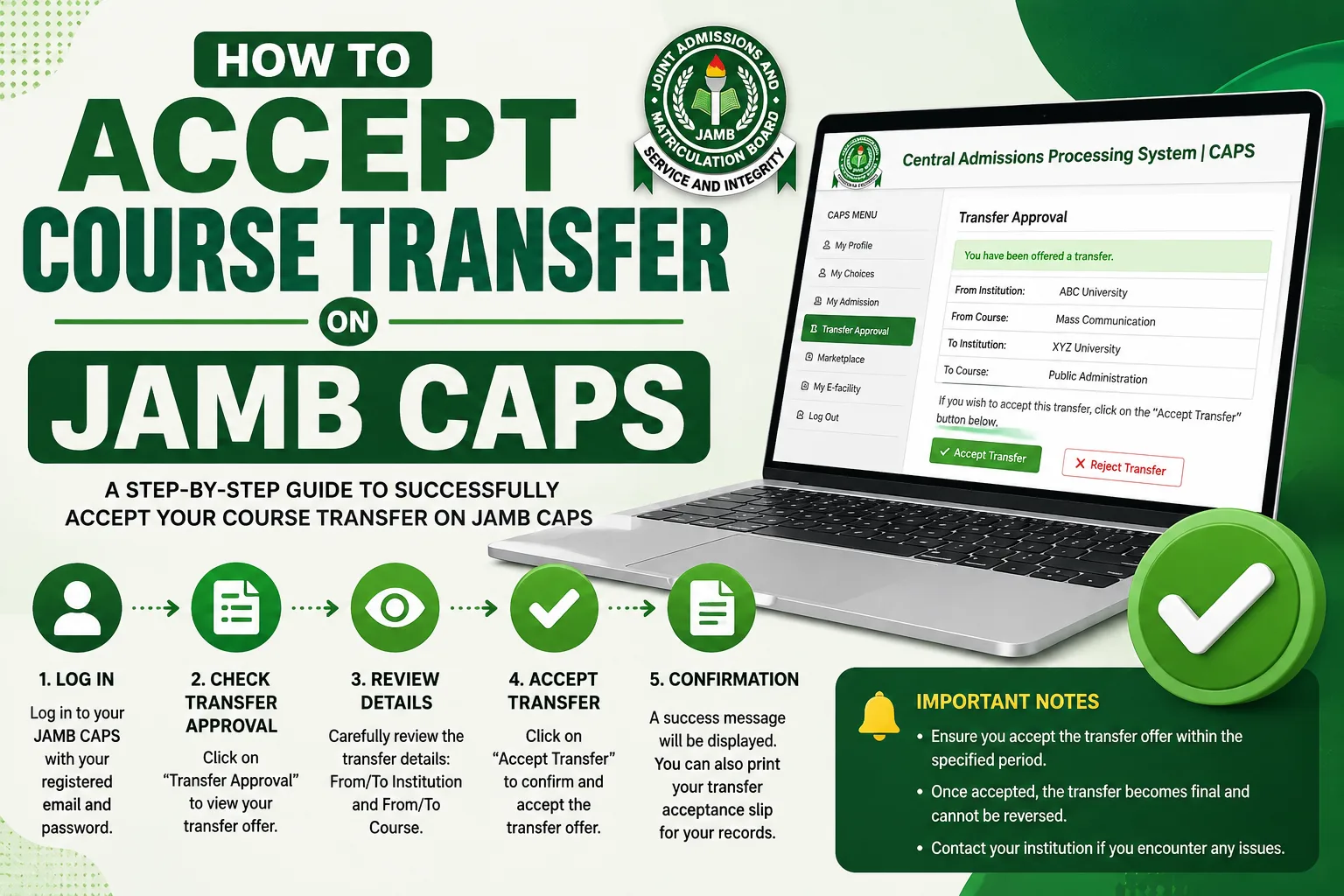
Quick Answer: How to Accept Course Transfer on JAMB CAPS
If you want the short version, here it is:
- Go to portal.jamb.gov.ng/efacility and log in with your email and password.
- Click Check Admission Status, then select your UTME year (2026 if you sat the 2026 exam).
- Click Access My CAPS.
- On the left menu, click Transfer Approval.
- If your school has moved you to another course, you will see the new course details. Click Accept.
- If the offer status shows Pending Candidate’s Action, click Accept Offer to complete the process.
That is the full process on the portal. The rest of this article explains each step in detail, so you do not make a costly mistake.
What Is Course Transfer on JAMB CAPS?
CAPS means Central Admissions Processing System. It is the platform JAMB uses to manage admissions into Nigerian universities, polytechnics, colleges of education and other tertiary institutions. Schools use it to recommend candidates for admission, JAMB approves, and candidates use it to accept or reject offers.
A course transfer (also called programme transfer) happens when the school you chose as your first choice cannot admit you into the course you applied for, but is ready to offer you a different course in the same school.
For example, you chose Medicine and Surgery, but your UTME score and post-UTME result did not reach the cut-off for that course. The school may then say, “We cannot offer you Medicine, but we can offer you Biochemistry or Microbiology.” That offer appears on your CAPS profile as a transfer request, and you must decide whether to accept or reject it.
In simple words, the school is saying: “We still want you, but in another department.”
Course Transfer vs Change of Course: Do Not Confuse Them
Many candidates mix these two up, so let us make it clear.
| Feature | Course Transfer (Transfer Approval) | Change of Course (by you) |
|---|---|---|
| Who starts it? | The school | You, the candidate |
| Where does it appear? | Transfer Approval page on CAPS | Change of Course/Institution request on the JAMB portal |
| Do you pay JAMB for it? | No payment is needed to accept or reject | Usually requires a fee, paid through the official JAMB channel |
| What do you do? | Accept or reject the school’s offer | Apply for the new course yourself |
| Result | School proposes you for the new course | Your JAMB record is updated, if approved |
If you want to change your course by yourself, that is a different process. You can read our guide on how to change course on the JAMB portal. This article is only about accepting a transfer that the school has offered you.
Why Schools Transfer Candidates to Another Course
There are a few common reasons a school may place you in a different course:
- Your score is below the course cut-off. Courses like Medicine, Law, Pharmacy, Nursing and Engineering often have higher cut-off marks than other courses in the same school.
- The course is full. Some departments have a fixed carrying capacity, which means they can only take a certain number of students.
- Your O’Level subjects do not match. If your O’Level result does not meet the requirements of your chosen course, the school may offer you a related course that you qualify for.
- Supplementary admission. After the main list, some schools fill remaining spaces by moving candidates from their first-choice courses to courses with vacancies.
The school makes this decision, not JAMB. JAMB only provides the platform where you give your consent.
Why Accepting the Transfer Matters
This is the part many candidates ignore, and it is the part that causes problems.
A notice from the Federal University of Technology, Owerri (FUTO) to candidates offered courses that were not their first choice explains it well: candidates must visit the Transfer Approval page on JAMB CAPS to accept the transfer, so that their admission can move forward. The page is where JAMB tells you that your first-choice school wants to move you to another course, and you must accept the offer for you to be visible for admission on CAPS.
The University of Lagos (UNILAG) also published a clear warning in its 2024/2025 admission closure notice. It said some candidates offered admission into programmes different from their original choices had not accepted the transfer offers, so the Admission Office could not propose their admission on CAPS. Those who did not accept before the deadline were told their admission would be considered forfeited.
So here is the simple truth:
If the school transfers you to another course and you do not accept it on CAPS, the school may not be able to propose you for admission. You may lose the place completely.
This is why you must not wait.
Important 2026/2027 Admission Updates You Should Know
Before we go into the steps, here are the current rules and dates from the 2026/2027 admission exercise. They affect how fast you must act.
1. Four-Week Window to Accept Admission Offers
At the 2026 JAMB policy meeting, the Registrar, Prof. Ishaq Oloyede, approved that successful candidates must accept their admission offers within four weeks. Candidates who fail to accept within the stated period risk having the offer withdrawn, and they may become ineligible for further admission consideration in that session.
To be safe, do not wait for the four weeks to finish. Treat any transfer request as urgent. Some schools give a much shorter time. For example, UNILAG told affected candidates in October 2025 to accept or reject a new course within 24 hours of the notification. Always check the time your school gives you.
2. Admission Closing Dates for 2026
JAMB and stakeholders fixed deadlines for institutions to finish their 2026 admission exercise:
| Type of Institution | Admission Closing Date |
|---|---|
| Public universities | October 31, 2026 |
| Private universities | November 30, 2026 |
| Polytechnics, monotechnics and colleges of education | December 31, 2026 |
JAMB also warned that once the deadline for a category passes, any institution that has not finished its admissions will no longer have access to candidates for that session. As of today, October 13, 2026, public universities have less than three weeks left. That is why you should not delay.
3. CAPS Disruption Has Been Fixed
JAMB announced a temporary shutdown of CAPS on September 24, 2026, because of technical problems with its hosting arrangement. The board later confirmed that CAPS was back and fully operational on September 28, 2026, and said the admission deadlines remained unchanged. If you could not access CAPS some weeks ago, you can now log in normally.
4. Cut-Off Marks for 2026
The 2026 policy meeting retained 150 as the minimum admissible UTME score for universities and colleges of nursing, while polytechnics and monotechnics are at 100. Remember that these are the minimum marks set by JAMB. Each school can set a higher cut-off for its own courses, and this is often the reason for course transfers.
Before You Start: What You Need
To avoid delays, prepare these things before you open the portal:
| Requirement | Why You Need It |
|---|---|
| Your JAMB registration number | To identify your profile |
| The email address and password you used for JAMB registration | To log in to the e-facility portal |
| A phone with data or a laptop | The portal can be opened on both |
| A stable network | CAPS can be slow when many candidates log in at the same time |
| The notice from your school (if any) | To confirm the course and deadline offered to you |
If you forgot your password, use the password recovery option on the JAMB portal. Do not give your login details to anyone, including people who promise to “help you accept admission.”
How to Accept Course Transfer on JAMB CAPS: Full Step-by-Step Guide
Here is the complete process for how to accept course transfer on JAMB CAPS, explained slowly so you can follow it on your phone or computer.
Step 1: Open the JAMB e-Facility Portal
Open your browser (Chrome works well) and go to the official address: portal.jamb.gov.ng/efacility. Check the address carefully. Fake websites exist, and they collect candidates’ login details.
Step 2: Log In to Your Profile
Enter the email address and password you used when you created your JAMB profile. Then click the login button.
Step 3: Click “Check Admission Status”
On your dashboard, look for Check Admission Status and click it. You may be asked to select the exam year. If you wrote the 2026 UTME, choose 2026. Choosing the wrong year is one of the most common reasons candidates see a blank page.
Step 4: Click “Access My CAPS”
You will see an option called Access My CAPS. Click it, and the system will open your CAPS profile.
Step 5: Open the “Transfer Approval” Page
On the left panel of your CAPS dashboard, click Transfer Approval. This is the page that shows whether your school has moved you to another course.
You will see one of two things:
| What You See | What It Means | What To Do |
|---|---|---|
| “No Programme Transfer Consideration” | Your school has not moved you to another course | Nothing to accept. Keep checking from time to time |
| Course and institution details | Your school has offered you a different course | Continue to Step 6 |
Step 6: Read the Offer Details Carefully
Before you click anything, read the new course name and the institution. Ask yourself:
- Is this course acceptable to me?
- Can I study this course for the full number of years?
- Does the course lead to a career I can accept?
This step matters because acceptance is a serious decision. Once you accept, you are telling the school and JAMB that you agree to the change.
Step 7: Click “Accept”
If you are happy with the new course, click the Accept button. The offer details will appear on your screen.
Step 8: Confirm With “Accept Offer”
Some candidates stop at Step 7 and think everything is done. It is not. According to the FUTO notice, you should click Accept Offer when the offer status shows Pending Candidate’s Action, to make sure the transfer is successful.
After this, the school can propose you for the new course on CAPS.
Step 9: Take a Screenshot and Check Again Later
Take a screenshot of the confirmation page. Check your CAPS again after a day or two. If your school has proposed you, your admission status will move forward. Later, when your admission is approved and you accept it, you can print your JAMB admission letter from the portal.
How to Reject a Course Transfer
If you do not want the new course, you can click Reject on the Transfer Approval page instead. UNILAG’s guidelines also show that candidates can choose to accept or reject a transfer on this page.
Before you reject, think carefully. Rejecting means you may lose the admission chance in that school for the session. If you want a different course or a different school, you may explore other options, such as the official change of course or institution process, or supplementary admission lists from other schools. You can read about the first option in our guide to changing course on the JAMB portal.
Accept Transfer First, Then Accept Admission
There are two separate actions on CAPS, and many candidates mix them up:
| Action | Where | When |
|---|---|---|
| Accept course transfer | Transfer Approval page | When your school moves you to a new course |
| Accept admission | Check Admission Status page on CAPS | When JAMB approves your admission and it shows as offered |
In other words, the transfer step comes first, and the admission step comes later. After the transfer is accepted and your school proposes you, you will still need to accept the admission itself when it appears. For that, read our full guide on how to accept admission on JAMB CAPS.
Common Problems and How to Solve Them
| Problem | Possible Reason | What You Can Do |
|---|---|---|
| Transfer Approval page is empty | No transfer has been requested by your school | Wait and check again. Contact the school’s admission office if you were told to expect one |
| “No Programme Transfer Consideration” | Same as above | No action needed |
| Accept button does not work | Network issue or heavy traffic | Try again at off-peak hours, clear your browser cache, or switch browsers |
| Cannot log in | Wrong password or email | Use the password recovery option on the portal |
| CAPS shows blank course or school | Wrong exam year selected, or the school has not uploaded yet | Select the correct UTME year and check back later |
| Offer expired | You did not respond in time | Contact the school’s admission office and JAMB officially. Do not pay anyone for a “fix” |
| Transfer accepted but no update | The school has not yet proposed you | Wait a few days, and follow the school’s official notices |
Mistakes That Can Cost You Your Admission
These are the errors we see again and again in admission discussions:
- Waiting too long. The four-week rule and the closing dates are real. Some schools give only 24 hours.
- Accepting a course you do not want. Once you accept, changing again can be difficult. Think before you click.
- Rejecting because of rumours. Some candidates reject after reading unverified posts on social media. Always confirm with your school.
- Using the wrong exam year. Always select the year you wrote UTME.
- Paying “agents.” You do not need to pay anyone to accept a transfer on CAPS. The process is free on the official portal. If someone asks for money to “secure” your transfer, be careful, because it may be a scam.
- Ignoring school notices. Your school may post important instructions on its official website or portal. Check them regularly.
- Not logging in at all. Some candidates only wait for SMS or email. Notifications can fail, so check CAPS yourself.
What Happens After You Accept the Transfer?
Here is the normal order of events:
| Stage | What Happens |
|---|---|
| 1 | You accept the transfer on the Transfer Approval page |
| 2 | The school proposes you for the new course on CAPS |
| 3 | JAMB reviews and approves the admission (if you meet the requirements) |
| 4 | Your CAPS shows that admission has been offered |
| 5 | You accept the admission within the allowed time |
| 6 | You print your JAMB admission letter |
| 7 | You follow the school’s steps: acceptance fee, clearance, registration |
Note that accepting a transfer does not mean you can skip the other steps. Your school may still ask for your O’Level result, birth certificate, documents for screening, and payment of an acceptance fee. Follow only the official instructions published by your school.
Also, make sure your O’Level results are uploaded on CAPS where required. JAMB has activated the portal for uploading 2026 O’Level results on CAPS, so check that your result is correctly uploaded and visible. If your result is not uploaded, your admission may be delayed.
Tips to Avoid Losing Your Admission in 2026/2027
- Check CAPS every few days during the admission period, not only when you get a message.
- Follow your school’s official website and portal for supplementary list announcements and transfer notices.
- Do not wait for the last day. Network failure on the last day has cost many candidates their admission.
- Keep your JAMB login details safe. Do not share them.
- Use only official links. The JAMB e-facility address is portal.jamb.gov.ng/efacility.
- Keep screenshots of every action you take.
- If you have old admission offers from 2021 to 2025, note that JAMB extended the deadline for such outstanding offers to November 30, 2026. According to the report, candidates offered admission in 2026 who still had earlier offers pending could reject the earlier offers without affecting their 2026 admission.
Is Course Transfer Good or Bad for You?
There is no one answer for everyone. Think about these points:
| Consider | Questions to Ask Yourself |
|---|---|
| Career goal | Can the new course still lead me to the career I want? |
| Related courses | Is the new course close to my first choice (for example, Biochemistry instead of Medicine)? |
| Time | Will I waste another year if I reject and try again? |
| Cost | Are the fees similar? Is the school’s total cost within my family’s budget? |
| Interest | Will I be able to study this course happily for four or five years? |
| Future change | Does the school allow internal transfer after the first year? Ask the school directly about its policy. |
Many candidates who accept a related course later do well in it, and some apply for an internal transfer after their first year, where the school’s rules allow it. However, never assume that you can change later. Ask the school’s admission office before you decide.
Frequently Asked Questions (FAQs)
1. What does “Transfer Approval” mean on JAMB CAPS?
It is the page where JAMB shows you that your first-choice institution wants to move you from the course you applied for to another course in the same school. You must accept the offer for the school to be able to propose you for admission.
2. How do I accept course transfer on JAMB CAPS?
Log in at JAMB portal, click Check Admission Status, select Access My CAPS, open Transfer Approval, then click Accept. If the status shows Pending Candidate’s Action, click Accept Offer to complete the process.
3. What if I see “No Programme Transfer Consideration”?
It means your school has not moved you to another course. There is nothing to accept at the moment. You can check again later, especially when supplementary admission lists are released.
4. Do I pay anything to accept a course transfer on CAPS?
No. Accepting a transfer on the official CAPS portal does not require payment to JAMB. Be careful with anyone who asks for money to “process” your transfer.
5. How long do I have to accept a course transfer?
JAMB’s 2026 policy gives candidates four weeks to accept admission offers, or the offer may be withdrawn. However, some schools give shorter deadlines for transfers. For instance, UNILAG once gave 24 hours. Always follow the time on your school’s notice and act quickly.
6. What happens if I do not accept the transfer?
The school may not be able to propose you for admission, and the place may be forfeited. UNILAG’s 2024/2025 notice clearly stated that admission would not be proposed for candidates who did not accept transfers before the deadline.
7. Can I reject the transfer and wait for my original course?
You can reject, but it is risky. The school gave the transfer because you did not meet the requirements for your original course, or the course was full. Rejecting may mean you lose the place in that school. Think about it carefully, and ask the school’s admission office if you are unsure.
8. Is accepting a course transfer the same as accepting admission?
No. Accepting the transfer is only your agreement to the new course. The admission itself must still be proposed by the school, approved by JAMB, and accepted by you on CAPS when it appears.
9. Can I change the new course after accepting it?
It depends on the school and JAMB rules. Some schools allow internal transfer after the first year, with conditions. You can also explore JAMB’s official change of course procedure while it is available. Do not accept a course you completely refuse to study just because you hope to change it later.
10. Why can’t I see the Transfer Approval page or any course details?
You may have chosen the wrong exam year, the school may not have uploaded your details yet, or the site may be slow. Select your correct UTME year, try again at a quieter time, and check your school’s official notices.
11. Is CAPS working now after the September disruption?
Yes. JAMB announced that CAPS returned to full operation on September 28, 2026, after the temporary shutdown that began on September 24. If you have network problems, try again later or use a different browser.
12. Can I accept the transfer using my phone?
Yes. The JAMB e-facility portal works on a phone browser. Use Chrome or any updated browser, make sure your data is stable, and type the official address carefully.
13. What is the last date for admission in 2026?
The approved closing dates are October 31, 2026 for public universities, November 30, 2026 for private universities, and December 31, 2026 for polytechnics, monotechnics and colleges of education. Do not wait for these dates, because your school may close its list earlier.
14. What should I do if my transfer offer has expired?
Contact your school’s admission office and the nearest JAMB office through official channels. Explain clearly what happened, and attach a screenshot if you have one. Do not pay any individual who promises to reopen the offer for you.
Conclusion
Knowing how to accept course transfer on JAMB CAPS can protect your admission. The steps are simple: log in to the JAMB e-facility portal, open Access My CAPS, go to Transfer Approval, click Accept, and complete it with Accept Offer if your status shows Pending Candidate’s Action. The hard part is not the clicking. It is acting on time.
With public universities closing admissions on October 31, 2026, and JAMB’s four-week acceptance rule in place, delay can cost you your place. Check your CAPS today, read your school’s notices, and make your decision quickly but carefully. If you accept a different course, make sure you can live with it. If you are unsure, speak to your school’s admission office before you click.
And please, remember: use only official JAMB and school channels, and never pay a stranger to accept a transfer for you.
We wish you success in the 2026/2027 admission exercise.